


Batch screening matters because most real-world financial workflows are not about understanding one company. They are about narrowing down a universe. In practice, you start with a watchlist, an index, or a sector set, then ask simple questions such as: which companies have strong profitability, manageable leverage, and healthy cash generation? That first pass turns an overwhelming list of tickers into a short list you can actually research.
The challenge is that screening requires repetition. If you fetch fundamentals one company at a time, you end up rewriting the same code path for every symbol: call the endpoint, parse the JSON, extract a few fields, compute ratios, and handle missing data. Doing this manually in notebooks does not scale, and it is easy to introduce inconsistencies across analyses.
In this article, we will build a small-batch screening workflow using Financial Modeling Prep’s stable fundamentals endpoints, making it work even on the free tier, pulling the data, and wrapping it in a lightweight Streamlit UI so you can screen companies interactively and export the results for deeper analysis.
Let’s get into it!
Foundation
You can access the entire code used in this tutorial in this repository.
Batch screening is basically the process of ‘shortlisting’ in fundamental analysis. Rather than analyzing one company at a time, you begin with a list of tickers and systematically apply the same criteria: retrieve fundamentals, calculate several ratios, filter, and rank. Performing this manually in notebooks can become repetitive and may lead to inconsistencies.
A small, structured project helps you standardize the workflow, reuse parsing and ratio logic, and produce a clean output table you can export or integrate into a dashboard.
In this article, we will build a minimal batch fundamentals screener that does three things:
Fetch the latest annual fundamentals for a list of tickers
Compute simple screening metrics (for example, ROE and debt-to-equity)
Filter and display the shortlist in a lightweight Streamlit UI, with an option to export results as CSV.
This is not a complete analytics platform. It is a compact workflow you can reuse whenever you want to screen a set of companies before deeper analysis.
The Data Source
All data comes from Financial Modeling Prep’s stable API, using a single base URL:
https://financialmodelingprep.com/stableEach function is expressed as an endpoint on this base URL, with parameters passed via query strings. For this screener, we only use a small subset of endpoints focused on company fundamentals:
Income statement (
income-statement): revenue, net income, and other income statement fieldsBalance sheet (
balance-sheet-statement): total assets, total liabilities, and equity fieldsCash flow statement (
cash-flow-statement): operating cash flow and other cash flow items
Across these endpoints, we use consistent parameters:
symbol: the ticker (e.g., AAPL)period:annual(to keep the example simple and consistent)limit: usually1for “latest snapshot” screening (you can extend later to multi-year stability checks)
These three statements are sufficient to reconstruct a basic snapshot of a company’s fundamentals and compute simple screening ratios.
What the Batch Screener Does
Instead of exposing REST endpoints like the previous microservice, this project produces a screening table.
Given a list of tickers, it will:
Pull the latest annual income statement, balance sheet, and cash flow statement for each ticker
Compute a few simple metrics, such as:
ROE = netIncome / totalEquity
Debt-to-Equity = totalLiabilities / totalEquity
Cash flow health using operatingCashFlow (for example, requiring it to be positive)
3. Apply thresholds to filter the universe into a shortlist
4. Display results in Streamlit and allow CSV export for follow-up analysis
Project Architecture
We keep the project small and modular:
fmp_batch_screening/
├─ app/
│  ├─ __init__.py
│  ├─ config.py           # loads env vars (API key + base URL)
│  ├─ bulk_client.py      # fetches statements per ticker (batch via loop)
│  ├─ screening.py        # computes ratios + applies filters
│  └─ streamlit_app.py    # Streamlit UI (inputs, sliders, table, export)
├─ requirements.txt
└─ .env.example
At a high level, the flow is as follows:

Building the Batch Screening
We will start building our batch screening system. We will cover
Step 1: Define dependencies (requirements.txt)
Before writing any code, we want to lock down the project dependencies. This keeps the environment reproducible and makes it easy for anyone to install and run the screener.
Create a requirements.txt in the project root:
requests
python-dotenv
pandas
streamlit
Install them in your CLI:
pip install -r requirements.txtWhat happens here is that:
requestshandles HTTP calls to the FMP API.python-dotenvloads your.envfile into environment variables at runtime.pandasgives you a table structure (DataFrame) that is perfect for screening, sorting, and filtering.streamlitlets you turn the batch workflow into a simple UI without building a full web app.
Step 2: Configure environment variables (.env)
Next, create a .env file in the project root. This is where you store your API key and base URL. The goal is to keep credentials out of source code and make configuration consistent across scripts.
Create .env:
FMP_API_KEY=your_fmp_api_key_here
FMP_BASE_URL=https://financialmodelingprep.com/stable
The purpose of this is that:
FMP_API_KEYwill be injected into each API request asapikey=....FMP_BASE_URLbecomes the single source of truth for endpoint construction.By using a
.env, you can switch keys or URLs without touching any code.
Step 3: Centralize config in app/config.py
Instead of reading environment variables in every file, we centralise configuration in one place. This keeps the rest of the codebase clean and avoids duplication.
Create app/config.py:
import os
from dotenv import load_dotenv

load_dotenv()
FMP_API_KEY = os.getenv(”FMP_API_KEY”)
FMP_BASE_URL = os.getenv(
    “FMP_BASE_URL”,
    “https://financialmodelingprep.com/stable”,
).rstrip(”/”)
if not FMP_API_KEY:
    raise RuntimeError(
        “FMP_API_KEY is not set. Please configure it in your .env file.”
    )
Let’s break down what the code above does
load_dotenv()reads your.envfile and loads all variables into the environment.os.getenv("FMP_API_KEY")retrieves the API key for use elsewhere.FMP_BASE_URLhas a default fallback, and.rstrip("/")ensures the URL does not end with/.This avoids issues like
.../stable//income-statementwhen we later join paths.The
RuntimeErroracts as an early “fail fast” check so you don’t waste time debugging missing configuration later.
This file becomes a shared dependency across the rest of the project.
Step 4: Build the batch fundamentals fetcher (app/bulk_client.py)
The “batch” problem is not about one API call. It is about applying the same extraction logic consistently across many tickers. Here, we isolate all interactions with FMP into one module that:
fetches the latest annual statements for one ticker, then
loops across many tickers and builds a DataFrame.
Create app/bulk_client.py:
from typing import Any, Dict, List, Optional
import time
import requests
import pandas as pd
from app.config import FMP_API_KEY, FMP_BASE_URL

def fetch_latest_statements(symbol: str) -> Dict[str, Any]:
    “”“
    Fetch the latest annual income statement, balance sheet, and cash flow
    for a single symbol using stable endpoints.
    “”“
    symbol = symbol.upper()
    def _get(endpoint: str, extra_params: Optional[Dict[str, Any]] = None) -> List[Dict[str, Any]]:
        params: Dict[str, Any] = {
            “symbol”: symbol,
            “apikey”: FMP_API_KEY,
            “period”: “annual”,
            “limit”: 1,
        }
        if extra_params:
            params.update(extra_params)
        url = f”{FMP_BASE_URL}/{endpoint}”
        resp = requests.get(url, params=params, timeout=30)
        if not resp.ok:
            raise RuntimeError(
                f”FMP API error ({endpoint}) for {symbol}: “
                f”{resp.status_code} {resp.text[:200]}”
            )
        data = resp.json()
        if isinstance(data, list):
            return data
        if isinstance(data, dict):
            return [data]
        return []
    income_list = _get(”income-statement”)
    balance_list = _get(”balance-sheet-statement”)
    cashflow_list = _get(”cash-flow-statement”)
    income = income_list[0] if income_list else {}
    balance = balance_list[0] if balance_list else {}
    cashflow = cashflow_list[0] if cashflow_list else {}
    return {
        “symbol”: symbol,
        “date”: income.get(”date”) or balance.get(”date”) or cashflow.get(”date”),
        “revenue”: income.get(”revenue”),
        “netIncome”: income.get(”netIncome”),
        “totalAssets”: balance.get(”totalAssets”),
        “totalLiabilities”: balance.get(”totalLiabilities”),
        “totalEquity”: balance.get(”totalStockholdersEquity”) or balance.get(”totalEquity”),
        “operatingCashFlow”: cashflow.get(”operatingCashFlow”),
    }

def fetch_fundamentals_for_symbols(
    symbols: List[str],
    sleep_seconds: float = 0.25,
) -> pd.DataFrame:
    “”“
    Loop over a list of tickers and fetch the latest annual statements for each.
    Returns one DataFrame row per symbol.
    “”“
    cleaned = [s.strip().upper() for s in symbols if s.strip()]
    cleaned = list(dict.fromkeys(cleaned))  # de-duplicate, preserve order
    rows: List[Dict[str, Any]] = []
    for sym in cleaned:
        try:
            rows.append(fetch_latest_statements(sym))
        except Exception as exc:
            print(f”[WARN] Failed for {sym}: {exc}”)
        time.sleep(sleep_seconds)
    return pd.DataFrame(rows) if rows else pd.DataFrame()
This module has two layers: a single symbol and a batch loop.
1) fetch_latest_statements(symbol)
Uppercases the ticker so
aaplbecomesAAPL.Defines
_get(endpoint, extra_params)as a local helper:
- Builds query parameters (symbol,period=annual,limit=1, plusapikey).
- Constructs the URL using the stable base:f"{FMP_BASE_URL}/{endpoint}".
- Sends a GET request withrequests.get(...).
- If the API fails, it raises a clear error showing endpoint + status code + partial body.
- Normalizes responses so you always get a list of dictionaries.Calls
_get(...)three times:income-statementbalance-sheet-statementcash-flow-statementPicks the first result from each list (because
limit=1) and flattens only the fields we care about into a single dictionary.
That flattening step is important: instead of returning three raw JSON blobs, we return one consistent “row” suitable for a DataFrame.
2) fetch_fundamentals_for_symbols(symbols)
Cleans the input list:
- removes empty values
- uppercases everything
- de-duplicates (so you don’t waste calls)Loops over each symbol and calls
fetch_latest_statements.If one symbol fails, it prints a warning but continues the batch. This matters in real screening because a single broken ticker should not halt the entire run.
Sleeps briefly between calls to reduce the chance of rate-limit issues.
Returns a DataFrame with one row per ticker.
At this point, you’ve already converted “many API calls” into one table you can analyze.
Step 5: Compute ratios and build the screening rules (app/screening.py)
Raw statements are helpful, but screening is usually based on ratios. Here, we compute a minimal set of metrics from the fetched fields and apply filters to shortlist companies.
Create app/screening.py:
from typing import Dict, Any, Tuple, List
import pandas as pd

from app.bulk_client import fetch_fundamentals_for_symbols

DEFAULT_THRESHOLDS: Dict[str, Any] = {
    “min_roe”: 0.15,
    “max_debt_to_equity”: 0.5,
    “min_operating_cf”: 0.0,
}

def load_universe_with_ratios(symbols: List[str]) -> pd.DataFrame:
    “”“
    Fetch fundamentals and compute:
      - ROE = netIncome / totalEquity
      - Debt-to-Equity = totalLiabilities / totalEquity
    “”“
    df = fetch_fundamentals_for_symbols(symbols)
    if df.empty:
        return df
    def safe_div(num, den):
        try:
            if den is None or den == 0:
                return None
            return float(num) / float(den)
        except (TypeError, ZeroDivisionError):
            return None
    df[”roe”] = [
        safe_div(ni, eq) for ni, eq in zip(df.get(”netIncome”), df.get(”totalEquity”))
    ]
    df[”debt_to_equity”] = [
        safe_div(liab, eq)
        for liab, eq in zip(df.get(”totalLiabilities”), df.get(”totalEquity”))
    ]
    return df

def apply_screen(
    df: pd.DataFrame,
    min_roe: float,
    max_debt_to_equity: float,
    min_operating_cf: float,
) -> Tuple[pd.DataFrame, pd.DataFrame]:
    “”“
    Apply thresholds and return (cleaned_data, shortlist).
    “”“
    required = [”symbol”, “roe”, “debt_to_equity”, “operatingCashFlow”]
    missing = [c for c in required if c not in df.columns]
    if missing:
        return df, pd.DataFrame()
    df_clean = df.dropna(subset=required)
    mask = (
        (df_clean[”roe”] >= min_roe)
        & (df_clean[”debt_to_equity”] <= max_debt_to_equity)
        & (df_clean[”operatingCashFlow”] >= min_operating_cf)
    )
    shortlist = df_clean.loc[mask].copy()
    shortlist = shortlist.sort_values(”roe”, ascending=False)
    return df_clean, shortlist
Let’s break down what happens in the code above.
load_universe_with_ratios(symbols):
- Calls the batch client to get a fundamentals DataFrame.
- Definessafe_div()so ratio calculations do not crash when equity is missing or zero.
Computes:roefromnetIncome / totalEquityanddebt_to_equityfromtotalLiabilities / totalEquity
- Adds those computed values as new DataFrame columns.apply_screen(...):
- Verifies the required fields exist.
- Drops rows missing key metrics (because screening withNonevalues is meaningless).
- Applies your filter rules (min ROE, max leverage, min operating cash flow).
- Sorts results by ROE so the strongest profitability appears at the top.
This is the “brain” of the screener: you can keep extending it with more metrics later without touching the UI.
Step 6: Build the Streamlit UI (app/streamlit_app.py)
Now we expose the batch screener as an interactive app. The user provides the tickers and screening thresholds, then gets a shortlist table and CSV export.
Create app/streamlit_app.py:
import os
import sys

# Ensure project root (parent of “app”) is on sys.path
CURRENT_DIR = os.path.dirname(os.path.abspath(__file__))
PROJECT_ROOT = os.path.dirname(CURRENT_DIR)
if PROJECT_ROOT not in sys.path:
    sys.path.insert(0, PROJECT_ROOT)

import streamlit as st
import pandas as pd

from app.screening import (
    load_universe_with_ratios,
    apply_screen,
    DEFAULT_THRESHOLDS,
)

st.set_page_config(
    page_title=”FMPFundamentals Screener”,
    layout=”wide”,
)


@st.cache_data(show_spinner=True)
def get_universe_cached(symbols: tuple) -> pd.DataFrame:
    # symbols is a tuple here because cache_data needs hashable args
    return load_universe_with_ratios(list(symbols))


def main():
    st.title(”Batch Fundamentals Screener”)
    st.write(
        “This app uses only Financial Modeling Prep endpoints that are typically “
        “available on the **free plan** (annual financial statements). “
        “You provide a list of symbols, and the app fetches the latest annual “
        “income statement, balance sheet, and cash flow to compute basic ratios “
        “such as ROE and Debt-to-Equity.”
    )

    # Sidebar: symbols + criteria
    st.sidebar.header(”Universe & Screening Criteria”)

    default_symbols = “AAPL, MSFT, GOOGL, AMZN, META, NVDA, TSLA, JPM, BAC, NFLX”

    symbols_input = st.sidebar.text_area(
        “Symbols (comma or newline separated)”,
        value=default_symbols,
        help=”Provide a list of tickers to screen. “
             “Example: AAPL, MSFT, GOOGL”,
        height=120,
    )

    min_roe = st.sidebar.slider(
        “Minimum ROE (Net income / Equity, latest annual)”,
        min_value=0.0,
        max_value=0.5,
        value=float(DEFAULT_THRESHOLDS[”min_roe”]),
        step=0.01,
    )

    max_debt_to_equity = st.sidebar.slider(
        “Maximum Debt-to-Equity (Total liabilities / Equity, latest annual)”,
        min_value=0.0,
        max_value=3.0,
        value=float(DEFAULT_THRESHOLDS[”max_debt_to_equity”]),
        step=0.05,
    )

    min_operating_cf = st.sidebar.number_input(
        “Minimum Operating Cash Flow (latest annual, absolute)”,
        value=float(DEFAULT_THRESHOLDS[”min_operating_cf”]),
        step=1_000_000.0,
        format=”%.0f”,
        help=”Set to >0 to require positive operating cash flow.”,
    )

    st.sidebar.markdown(”---”)
    st.sidebar.write(”Edit the symbols and criteria, then click **Run Screening**.”)

    if st.button(”Run Screening”):
        # Parse symbols
        raw = symbols_input.replace(”\n”, “,”)
        symbols = [s.strip().upper() for s in raw.split(”,”) if s.strip()]

        if not symbols:
            st.warning(”Please provide at least one symbol.”)
            return

        try:
            df_universe = get_universe_cached(tuple(symbols))
        except Exception as e:
            st.error(f”Error fetching data from FMP: {e}”)
            return

        if df_universe.empty:
            st.warning(”No data returned from the financial statement endpoints.”)
            return

        st.subheader(”Universe Preview”)
        st.write(
            f”Fetched latest annual statements for **{len(df_universe)}** symbols.”
        )

        st.write(”Columns available (first 20):”)
        st.code(”, “.join(df_universe.columns.tolist()[:20]), language=”text”)

        df_all, df_screened = apply_screen(
            df_universe,
            min_roe=min_roe,
            max_debt_to_equity=max_debt_to_equity,
            min_operating_cf=min_operating_cf,
        )

        if df_screened.empty:
            st.warning(
                “No companies passed the current screening rules. “
                “Try relaxing the filters or inspect the raw data.”
            )
            with st.expander(”Show full dataset”):
                st.dataframe(df_all)
            return

        st.subheader(”Screening Results”)
        st.write(
            f”Companies passing the screen: **{len(df_screened)}**. “
            “Sorted by ROE descending.”
        )

        display_cols = [c for c in [            “symbol”,            “date”,            “roe”,            “debt_to_equity”,            “operatingCashFlow”,            “revenue”,            “netIncome”,            “totalAssets”,            “totalLiabilities”,            “totalEquity”,        ] if c in df_screened.columns]

        st.dataframe(df_screened[display_cols].reset_index(drop=True))

        # Simple bar chart of top N by ROE
        top_n = min(20, len(df_screened))
        chart_df = df_screened.head(top_n)
        if “symbol” in chart_df.columns and “roe” in chart_df.columns:
            st.subheader(f”Top {top_n} by ROE (latest annual)”)
            st.bar_chart(
                chart_df.set_index(”symbol”)[”roe”]
            )

        with st.expander(”Download results as CSV”):
            csv = df_screened.to_csv(index=False)
            st.download_button(
                label=”Download CSV”,
                data=csv,
                file_name=”screened_companies.csv”,
                mime=”text/csv”,
            )

    else:
        st.info(”Provide symbols in the sidebar and click **Run Screening**.”)


if __name__ == “__main__”:
    main()
What happen in our Streamlit UI is:
Let’s break down what happens in the code above.
The
sys.pathblock ensures imports likefrom app.screening import ...work correctly in Streamlit (because Streamlit executes the file as a script).The sidebar captures two things:
- a user-defined ticker list
- screening thresholds (ROE, debt-to-equity, operating cash flow)@st.cache_datacaches results for the same ticker list:
- if you adjust only the thresholds, Streamlit reuses the fetched data instead of calling the API againWhen you click Run Screening, the app:
- parses tickers into a clean list
- fetches fundamentals and builds a DataFrame
- computes ratios
- applies screening rules
- renders the shortlist table and provides CSV export (plus a simple ROE chart)
Step 7: Run the app
From the project root:
streamlit run app/streamlit_app.pyOnce it runs, you can:
paste your own universe of tickers,
adjust thresholds,
export a shortlist for deeper analysis.
That is how we run the batch screening UI we just created. Let’s take a look at the system we just created by accessing it via localhost. If everything runs fine, you will see the screen something like below:
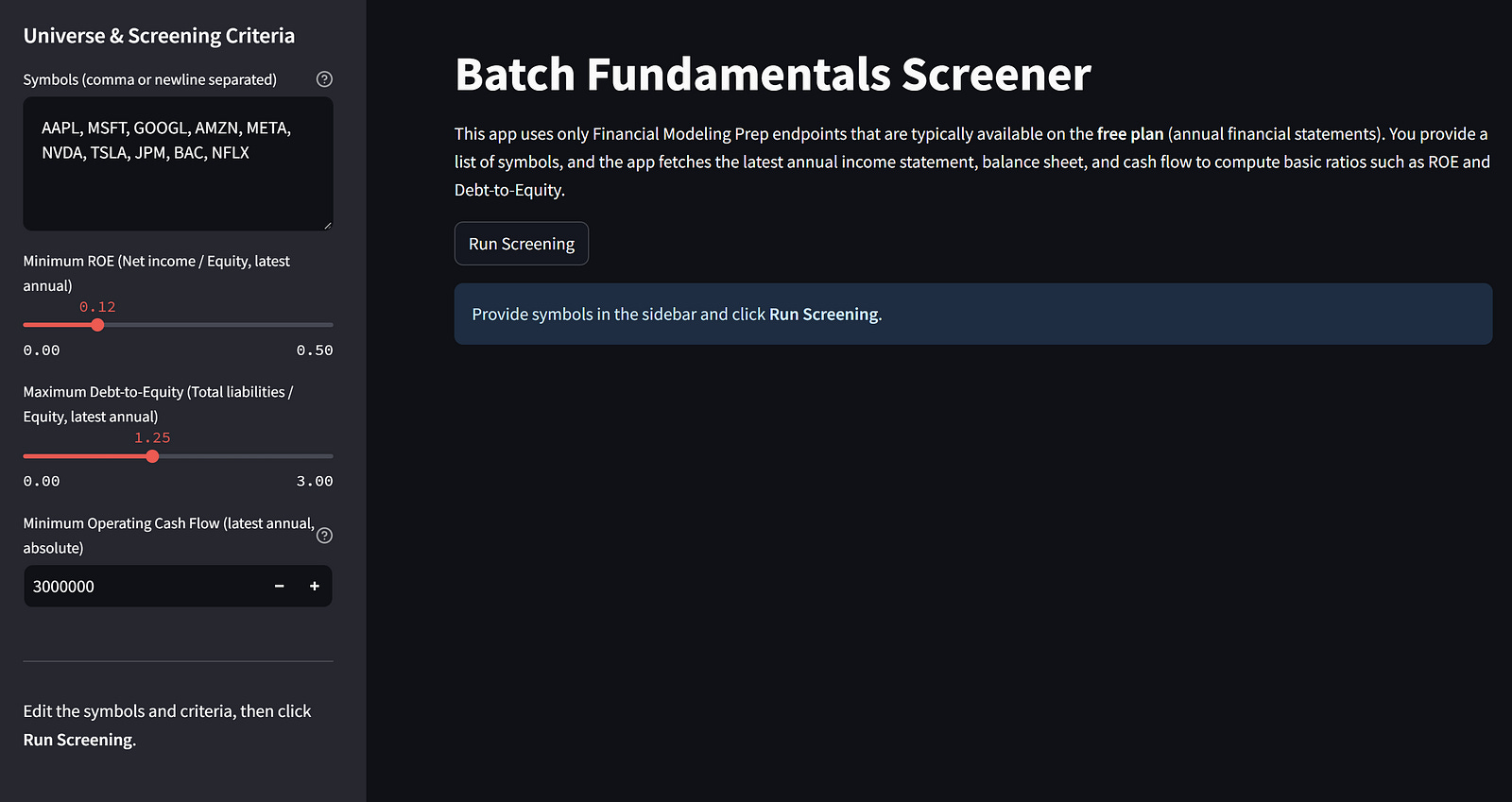
On the left side, you can enter all the information for the screening criteria, while on the right side is where all the information appears after we run the screening.
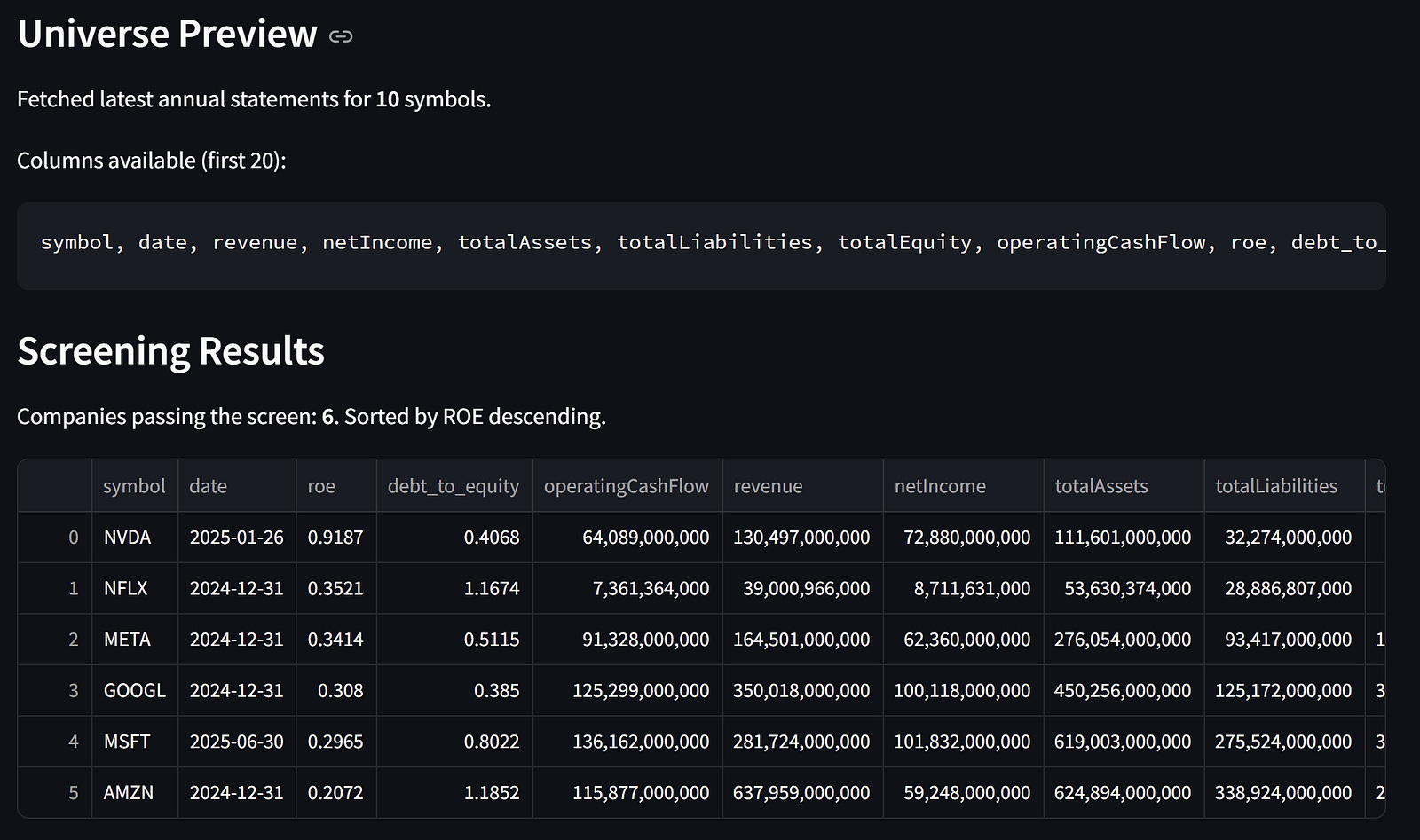
The result is the preview of the data universe we acquired and the screening results.
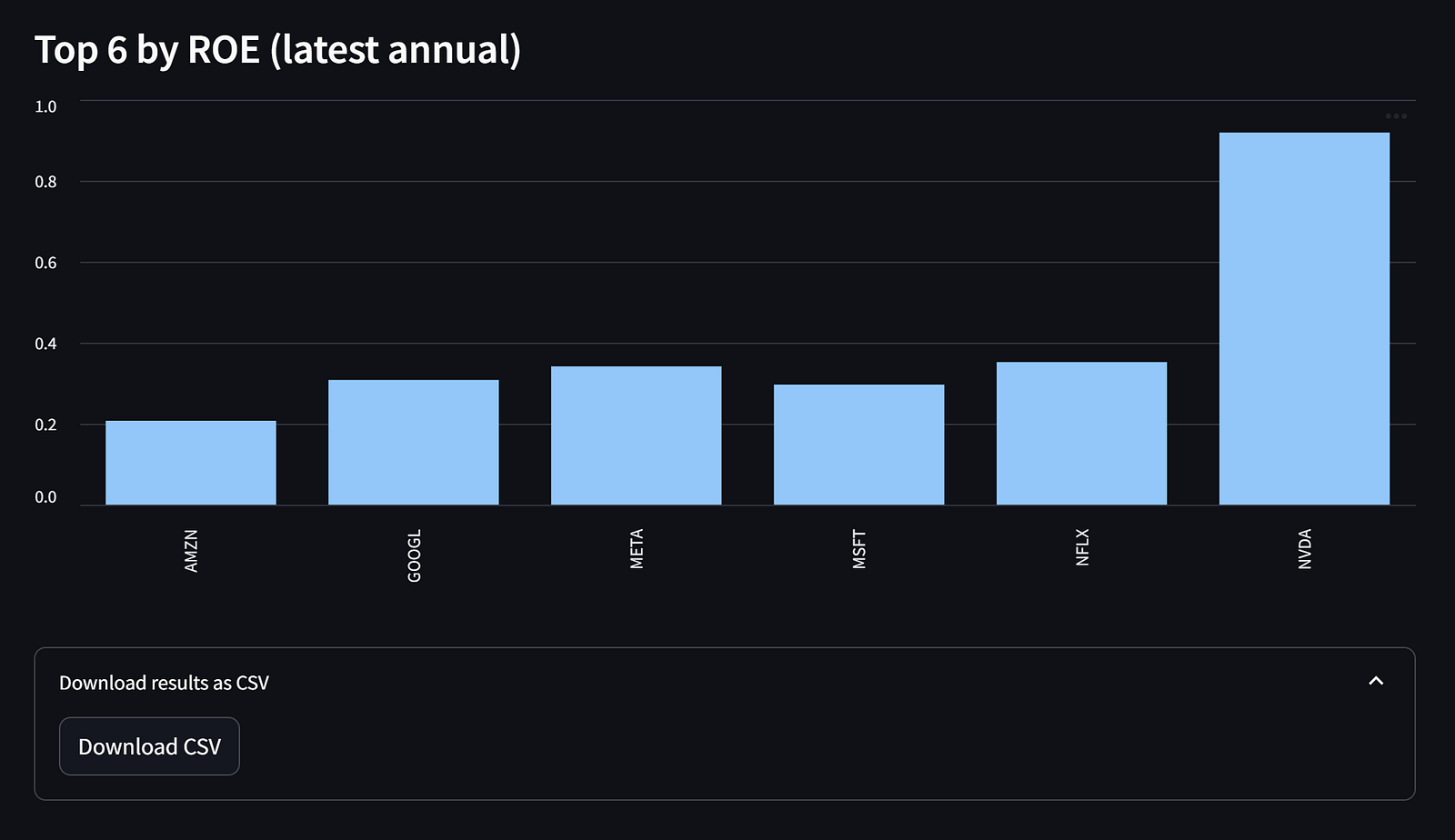
As additional features, we have a chart showing the company’s ROE that passes the screening and a button to download the results as CSV files.
That’s all you need to know to build our batch screening in FMP. You can always extend the metrics and add additional information you need.
Conclusion
In this article, we built a lightweight batch fundamentals screener on top of Financial Modeling Prep’s stable API to analyze many companies within a single, consistent workflow.
By combining a small data-fetching layer, simple ratio calculations (such as ROE and debt-to-equity), and a Streamlit interface, we can quickly turn a list of tickers into a shortlist that is easy to review and export.
You can use this project as a starting point for larger screening pipelines and extend it over time with multi-year stability checks, additional metrics, caching, or deeper drill-down views for shortlisted companies.