

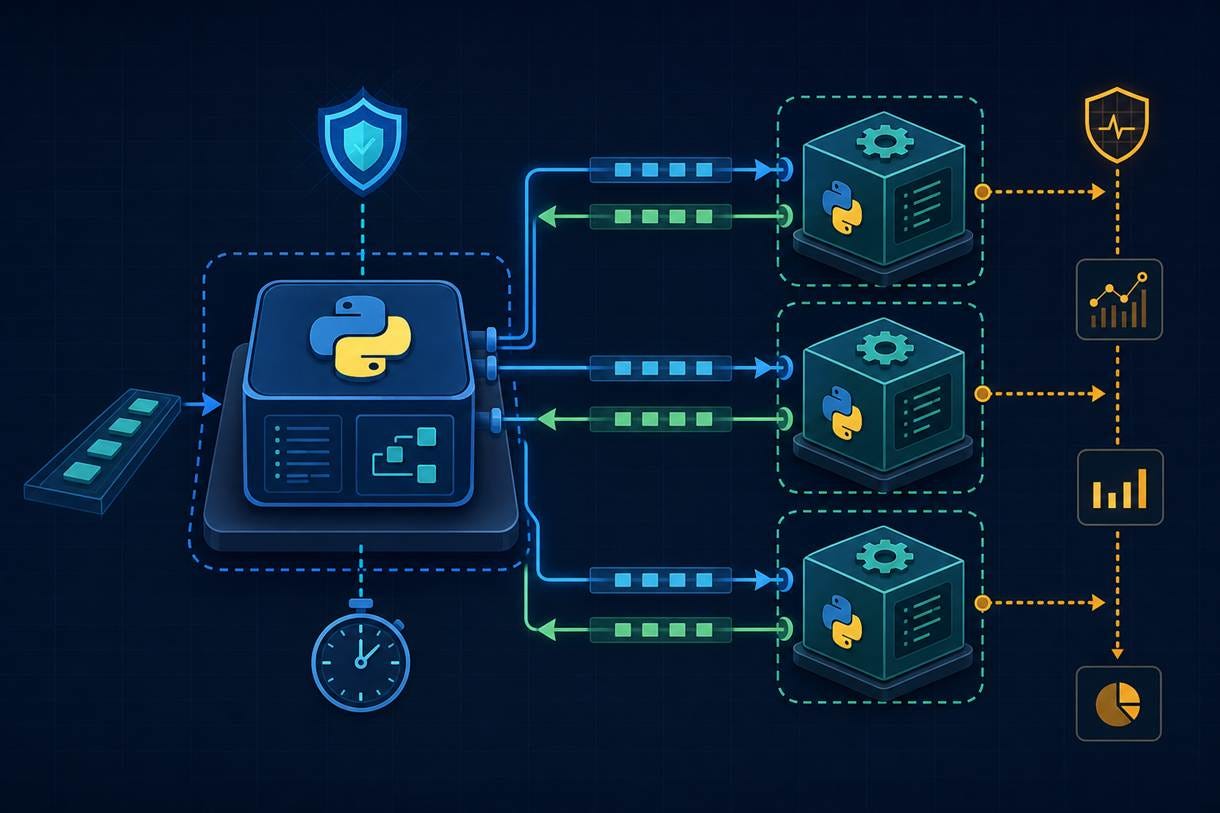
An agent harness is the code around that agent. It starts the work. It waits for the answer and handles failure but the harness does not decide what the answer should be.
Imagine that your application asks an agent to summarize a document. On a normal run, the agent returns some text and the application continues. But the agent might crash. It might also wait forever for another service.
A normal Python function call leaves the application waiting at that line until the function returns. If the agent never returns, the code after the call never runs. The application therefore needs a way to stay in control while the agent works.
This is why, this articlewill build that idea before looking at any files. Once the roles are clear, each part will become a small piece of Python code.
Curious about it? Let’s get into it.
The idea before the code
The first decision is to run the application and the agent as two separate programs. A running program is called a process. The operating system gives each process its own memory and can stop one without automatically stopping the other.
The application stays in the first process. It starts a second process when it has work for the agent. We call the second process the worker because its job is to perform one piece of agent work.
The first process now has another role. It starts the worker and watches for the result. We call it the supervisor because it can stop a failed worker and start a replacement. Worker and supervisor are names for these roles. They are not special Python features.
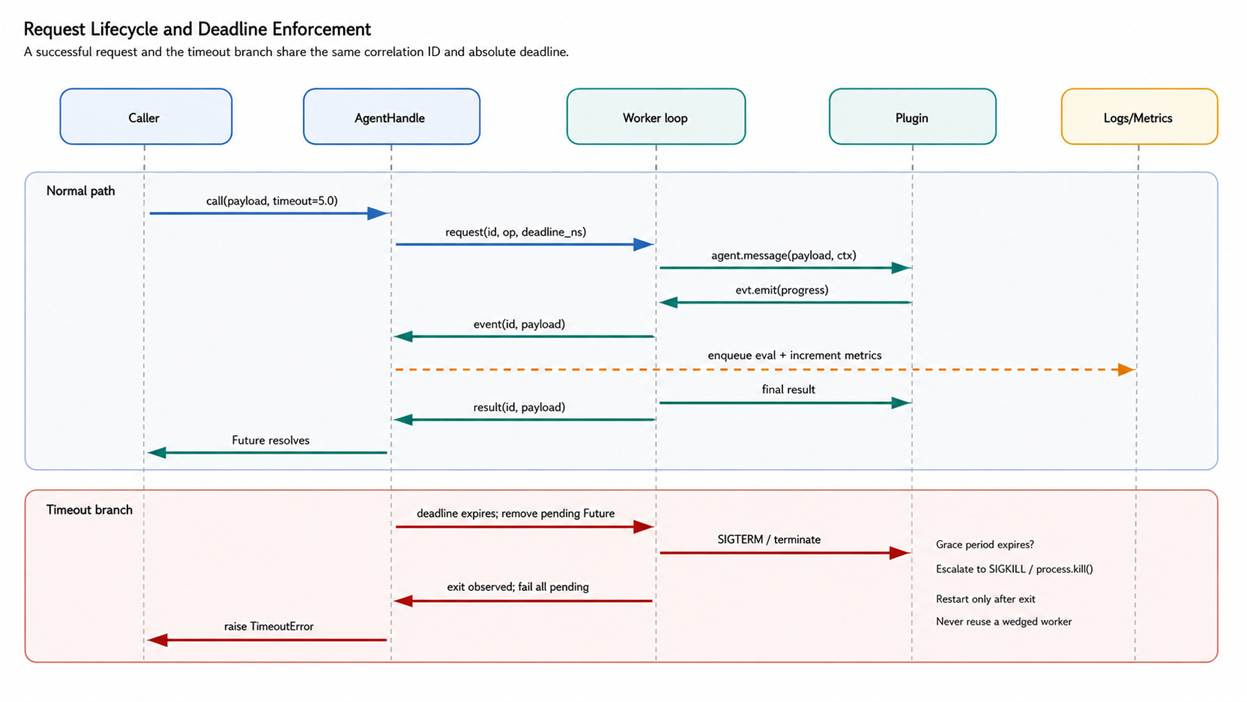
One request now follows this path:
1. The application asks the harness for an answer.
2. The harness starts a worker and sends it the request.
3. The worker gives the request to the agent code.
4. The worker sends the answer back to the harness.
5. If the answer takes too long, the harness stops the worker and reports an error.
This time limit is called a timeout. A timeout is the longest period the harness is willing to wait. The harness can enforce it because the harness is still running outside the worker.
The two-process design keeps the application in control. It also creates the next problem: the two processes no longer share the same memory. They need a way to exchange a request and a reply.
How the two processes exchange a message
When two pieces of code run in the same process, one function can pass a Python value directly to another. A dictionary is one kind of Python value. It stores named fields such as id and message. Separate processes cannot share that dictionary as a live value.
The operating system can connect the processes with a pipe. A pipe is a channel for moving data from one program to another. The harness writes at one end. The worker reads at the other end and uses a second connection for its reply.
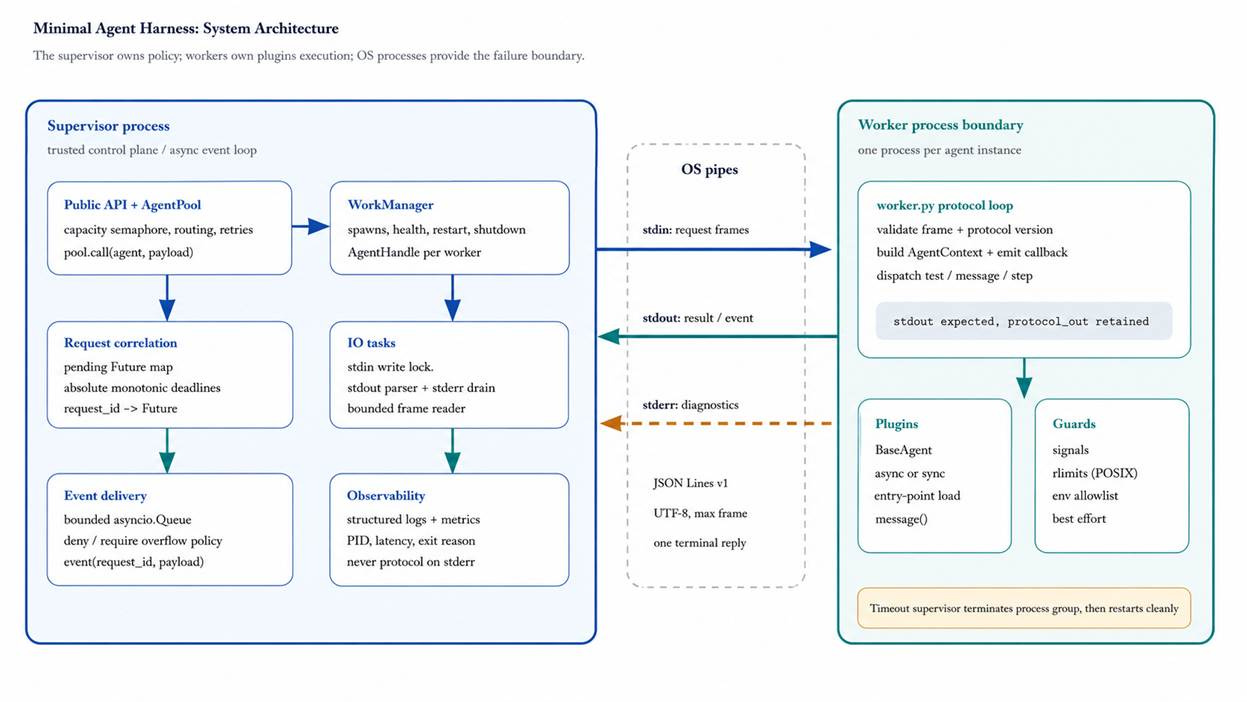
A pipe carries bytes, which are the raw units a program uses for data. Both programs therefore need a message format that Python can turn into bytes and back again. This example uses JSON, a common text format for named fields and values.
The example puts one complete JSON message on each line. This format is called JSON Lines. The line break marks the end of one message, so the reader knows when it has received the complete request.
A request contains an id and a message. The id is a label for the request. The worker copies that label into its reply. The ok field says whether the reply contains a value or an error.
request {”id”: “1”, “message”: “hello”}
reply {”id”: “1”, “ok”: true, “value”: “Agent received: hello”}
error {”id”: “1”, “ok”: false, “error”: “agent failed”}
In this beginner version, one worker handles only one request. Matching the id is still useful because it makes the message format clear. It also prepares the design for a later version that keeps workers alive.
We now have the full idea: two processes and a small message between them. Only now do we need to give the Python pieces filenames.
The four Python files
The example separates the design into four files. Each file has one job.
agent.pycontains the code that produces an answer.worker.pyreceives one request and calls the agent.harness.pystarts the worker and enforces the timeout.main.pyrepresents the application that wants an answer.
The filenames do not define the design. They make the roles easier to see in a small example. A larger application may organize the code differently while keeping the same separation.
We will build the files in the order that a request uses them. The agent behavior comes first because it is ordinary Python code.
1. The agent produces an answer
In Python, a class groups related behavior. The Agent class in this example has one method named reply(). A method is a function that belongs to a class. reply() receives a message and returns a short response.
Keeping the class this small matters. You can call reply() in a basic test without starting the rest of the system. You can also change the response logic without changing how the process is managed.
# agent.py
class Agent:
    def reply(self, message: str) -> str:
        return f"Agent received: {message}"
For now, reply() only shows which message it received. A real agent could call a model or use a tool here. The harness does not need to know how that answer is produced.
The class accepts a normal Python value. The worker is the piece that turns an incoming JSON message into that method call.
2. The worker connects the pipe to the agent
A command-line Python program has two standard text streams. Standard input is where text enters the program. Standard output is where the program writes its normal result.
The harness connects both streams to pipes when it starts the worker. The worker reads one line from standard input and converts the JSON text into a Python dictionary. It takes the message from that dictionary and passes it to Agent.reply().
If reply() returns normally, the worker creates a successful JSON reply. If Python reports an error, the except block receives that exception and creates an error reply instead. An exception is Python’s way of stopping the current operation and reporting what went wrong.
After building the reply, the worker writes one JSON line to standard output. Python may hold output briefly before sending it. flush() makes sure this line is sent at once. The worker then reaches the end of the file and exits.
# worker.py
import json
import sys

from agent import Agent

agent = Agent()
request = json.loads(sys.stdin.readline())

try:
    value = agent.reply(request["message"])
    reply = {
        "id": request["id"],
        "ok": True,
        "value": value,
    }
except Exception as exc:
    reply = {
        "id": request["id"],
        "ok": False,
        "error": str(exc),
    }

sys.stdout.write(json.dumps(reply) + "\n")
sys.stdout.flush()
Standard output is reserved The harness expects every line on standard output to contain JSON. A normal print() would add an unexpected line and break the message format. Send logs to standard error, which is a separate stream for diagnostic messages.
The exception path works only when Python gives control back to the worker. An endless loop does not do that. Code that never returns cannot create its own error reply, so the harness must handle that case from outside the worker.
3. The harness controls the worker
The harness runs in the application process. For each request, it starts one worker and sends one JSON line. It then waits for one reply.
While it waits, the harness keeps the timeout. If the reply arrives in time, the harness returns the value to the application. If the time limit passes, it ends the worker process and reports an error.
The example uses asyncio because starting a process and reading from a pipe both involve waiting. A function written with async def can pause at await until an operation finishes. During that pause, asyncio can run another part of the program.
asyncio.subprocess.PIPE tells Python to connect the worker’s standard input and standard output to the harness. Those connections give ask() a place to send the request and receive the reply.
With those ideas in place, the harness code is easier to read. The ask() function follows the same request path shown earlier.
# harness.py
import asyncio
import json
import sys
import uuid


async def ask(message: str, timeout: float = 5.0) -> str:
    process = await asyncio.create_subprocess_exec(
        sys.executable,
        "worker.py",
        stdin=asyncio.subprocess.PIPE,
        stdout=asyncio.subprocess.PIPE,
    )

    request = {
        "id": uuid.uuid4().hex,
        "message": message,
    }
    data = (json.dumps(request) + "\n").encode()

    process.stdin.write(data)
    await process.stdin.drain()

    try:
        line = await asyncio.wait_for(
            process.stdout.readline(),
            timeout,
        )
    except TimeoutError:
        process.kill()
        await process.wait()
        raise RuntimeError("agent timed out")

    await process.wait()
    if not line:
        raise RuntimeError("worker exited without a reply")

    reply = json.loads(line)
    if reply["id"] != request["id"]:
        raise RuntimeError("received the wrong reply")
    if not reply["ok"]:
        raise RuntimeError(reply["error"])

    return reply["value"]
Reading ask() from top to bottom
Start a new Python process that runs worker.py.
Create a request and turn it into one JSON line.
Write the line to the worker through standard input.
Wait for one reply until the timeout expires.
Check the reply and return the value or raise an error.
Starting the worker. asyncio.create_subprocess_exec() asks the operating system to start another program. sys.executable selects the same Python installation that is running the harness. The next argument tells Python to run worker.py.
Building the request. uuid.uuid4().hex creates a text id that is very unlikely to repeat. json.dumps() turns the request dictionary into JSON text. encode() changes that text into bytes for the pipe.
Sending and reading. drain() waits until Python has handed the request bytes to the pipe. readline() waits for one complete reply line. json.loads() changes the reply back into a Python dictionary.
Enforcing the timeout. asyncio.wait_for() stops waiting when the time limit passes and raises TimeoutError. Stopping the wait does not stop the worker. process.kill() is the line that ends it.
Cleaning up. process.wait() confirms that the worker has ended. The remaining checks reject a missing reply or the wrong id. RuntimeError passes those failures back to the application as normal Python exceptions.
The harness now has everything it needs to control one request. The last file shows what the application sees.
4. The application asks for an answer
main.py stands in for the rest of the application. It does not open pipes or create JSON. It calls ask() with a message and a time limit, then prints the returned answer.
# main.py
import asyncio

from harness import ask


async def main() -> None:
    answer = await ask("hello", timeout=2.0)
    print(answer)


asyncio.run(main())
Keep the four Python files in the same folder. Run python main.py from that folder. The normal result is Agent received: hello. The worker then closes because its one request is complete.
You can also test the failure path. Add time.sleep(10) at the start of Agent.reply() and set the timeout in main.py to 0.5 seconds. The harness should end the worker and report agent timed out.
That test is more than a demonstration of the error message. It shows that the application can recover without the agent’s help. The timeout works because it belongs to the process that can still act.
What changes in a larger system
The one-request version is enough to explain the boundary. A production service may need to reuse workers and handle more than one request at a time. Those changes require more tracking, but they do not change the basic roles.
Reusing workers
Starting Python for every request adds delay. A longer-running service may keep several workers ready. This fixed group of workers is called a pool.
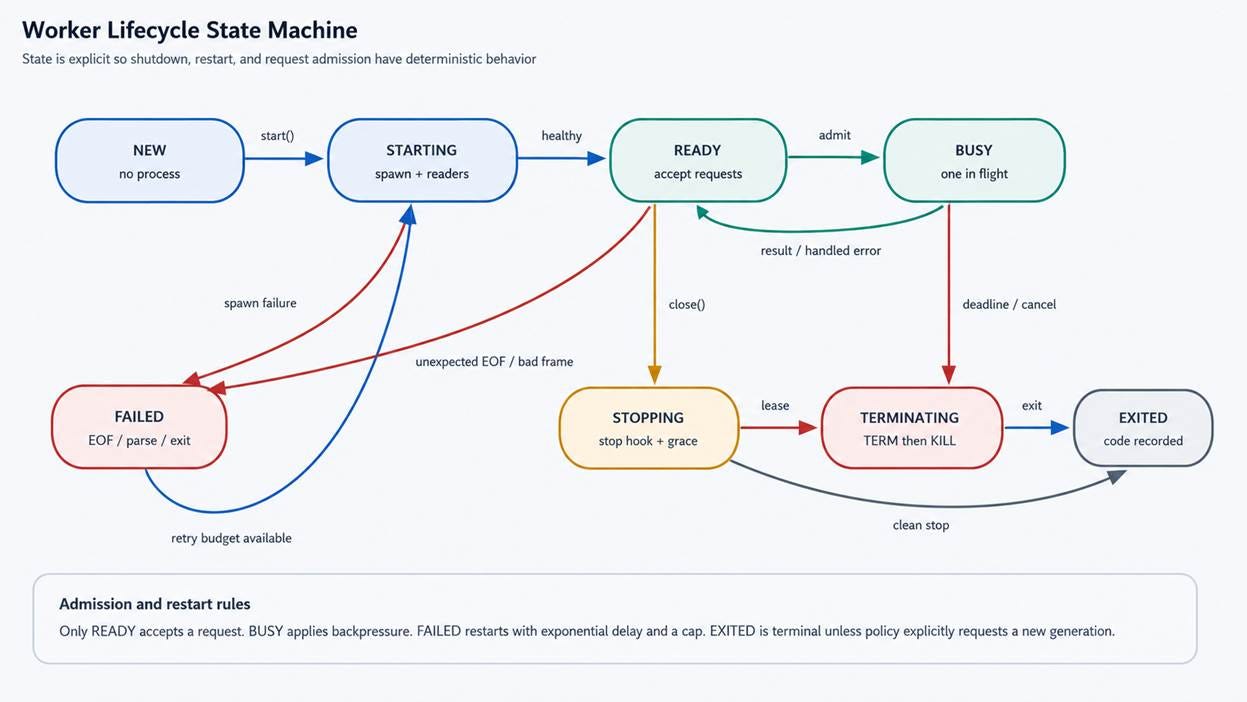
Each worker should still handle one request at a time. If four workers are ready, the service can run four requests. A fifth request waits or receives a busy response until a worker is free.
Recovering after a failure
A worker that crashes should not return to the pool. Replace it with a new process because you cannot know which in-memory values remain usable. The request that was running should receive an error instead of waiting forever.
A retry means sending the same request again after a failure. A retry can help when the cause was brief, but it needs a limit. Stop after a small number of attempts so one bad request cannot create an endless crash loop.
A reused worker also needs a state. State means the stage the worker is in now. It may be starting or ready. While a request runs it is busy. Once stopping begins it must not accept more work.
Permissions and untrusted code
A separate process isolates memory. It is not a security barrier. By default the worker may still read the application’s files and use its network access.
For an agent you trust, give the worker only the settings it needs. Run it with a user account that has limited file and network permissions. This reduces what a mistake can affect.
For code you do not trust, use a container or another restricted environment. A container can limit which files the program sees and which network connections it may open. Those limits come from the container settings rather than from the Python harness.
These production controls are easier to add after the one-request design is clear. The same request format can cross into a container or a reused worker.
Conclusion
An agent harness is the control code around agent behavior. It keeps the application able to respond when agent work crashes or takes too long. The separate worker process gives the harness that control.
The Python files follow the design rather than defining it. agent.py contains the behavior. worker.py connects that behavior to messages. harness.py owns the process and timeout. main.py only asks for an answer.
Start with one worker and one request until that flow is reliable. Add pools and retries only when the simpler version is clear. Keep the timeout in the process that can stop the worker.