


Financial data is one of the datasets that most companies and individuals need. It is sought for because it is helpful in many projects, such as building investment dashboards and portfolio trackers, running valuation and scenario analysis for listed companies, or training machine learning models for financial use cases. In all of these cases, the hard part is rarely “getting the data once.” The hard part is accessing the data cleanly and consistently every time you start a new project.
Financial Modeling Prep’s stable API provides a rich set of endpoints for financial fundamentals: income statements, balance sheets, cash flow statements, profiles, and more. It solves the problem of data source availability.
But there is still a hassle for developers: the APIs are relatively low-level. You have to remember the exact endpoint names, pass the proper query parameters, manage API keys in every script, and repeatedly transform the raw JSON into the handful of fields you actually need for your analysis.
This is where a small microservice comes in handy. Instead of remembering every FMP’s URLs and parameters, centralize that logic in one place and provide a few task-specific endpoints like “search companies,” “get snapshot,” and “get history.” This approach allows us to easily manage the data flow and even customize the overall data structure output.
In this article, we will build a minimal financial microservice on top of Financial Modeling Prep’s stable API. It will not replace a complete analytics platform; instead, it will provide a focused set of endpoints for any follow-up analytical process.
Let’s get into it.
Foundation
You can access the entire code used in this tutorial in this repository.
Before we move on to the technical part, we need to understand that building a microservice on top of existing APIs offers several practical benefits.
First, you reduce duplication. Transforming and cleaning the responses from FMP is implemented once, tested once, and shared across everything you build.
Second, you gain a single point for the overall information. Configuration of API keys, error handling, rate limiting, and caching can all live in the microservice rather than being reimplemented ad hoc.
Third, you create a more approachable entry point for others on your team. For example, they can request
/companies/AAPL/snapshotwithout needing to read the FMP documentation first.
These are a few benefits you have, primarily when you work as a developer and data scientist, that need consistency across all companies.
The Data Source
Let’s start building our financial microservice. We will begin by deciding which data from FMP we will use. For this project, all the data comes from Financial Modeling Prep’s stable API, where we will work with a single base URL and a consistent naming pattern using the following:
https://financialmodelingprep.com/stableEvery function is expressed as a specific endpoint on this base, with parameters passed as query string parameters.
In this microservice, we only use a small subset of what FMP offers, focusing on the core fundamentals most people need. To keep things simple, the service relies on five primary endpoints:
Company search (
search-symbol): Let’s you search by a company name or a partial ticker and returns candidates with symbols, names, exchanges, and currencies.Company profile (
profile): Returns basic information such as company name, exchange, currency, and other metadata.Income statement (
income-statement): Provides revenue, net income, and other income-statement fields over time.Balance sheet statement (
balance-sheet-statement): Provides total assets, total liabilities, and other balance sheet fields.Cash flow statement (
cash-flow-statement): Provides operating cash flow and other cash flow items.
Each of these endpoints will support parameters like:
symbolwhich is the ticker (e.g.AAPL),periodlikeannualorquarterly,limitwhich is the number of records you want (e.g., the last 5 years).
These data are enough to reconstruct a basic picture of a company’s fundamentals.
What the Financial Microservice does
In this project, we will develop a consistent REST API for the microservice:
GET /health: basic health check.GET /companies/search?q=...: search companies by name/symbol.GET /companies/{symbol}/snapshot: latest fundamentals snapshot (revenue, net income, assets, liabilities, operating cash flow, plus basic profile).GET /companies/{symbol}/history?years=N: simple time series of revenue and net income for the last N annual periods.
These endpoints will abstract the FMP URL details, the API key management, and the raw JSON shape. The endpoint itself is the minimum version, so it does not cover any complex authentication, database management, or advanced applications.
Project architecture
For the project architecture, we will follow the structure below:
fmp_microservice_financial/
├─ app/
│  ├─ __init__.py
│  ├─ main.py          # FastAPI app + routes
│  ├─ fmp_client.py    # Wrapper around FMP stable API
│  └─ schemas.py       # Pydantic models for responses
├─ requirements.txt
├─ .env.example
└─ Dockerfile
At the high level, the microservice will have the flow like below:
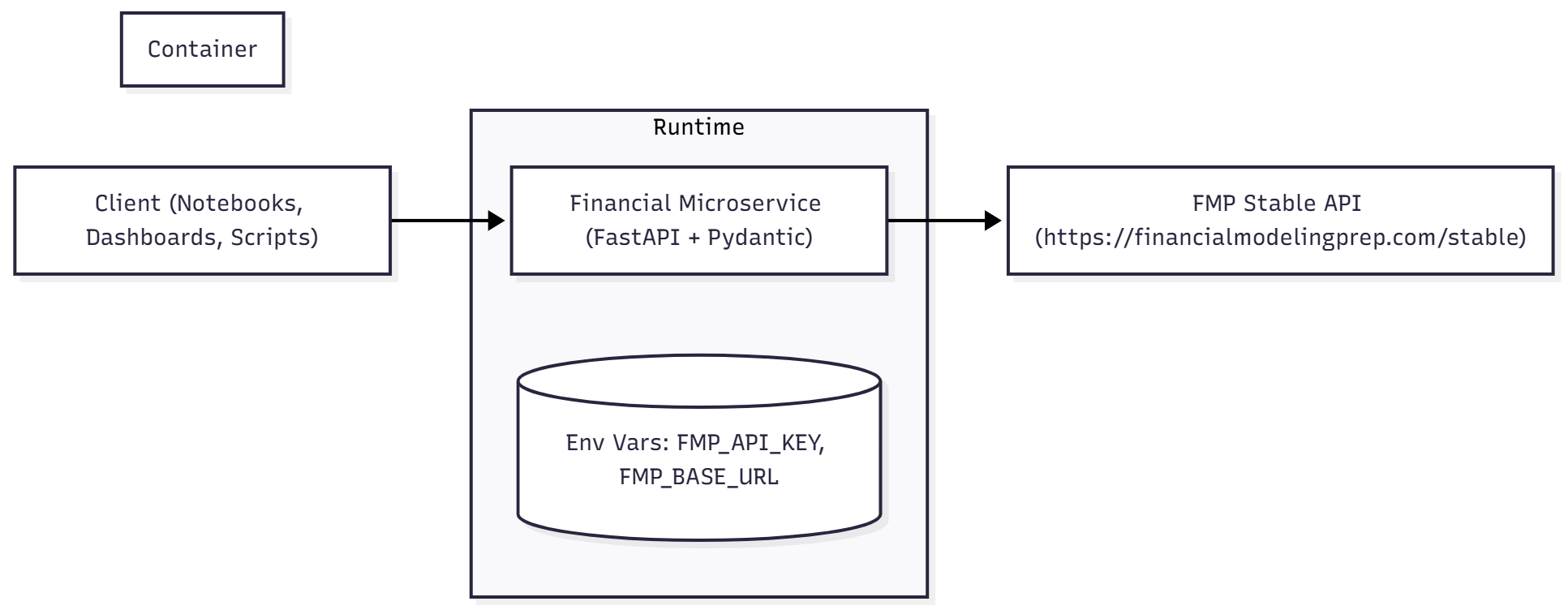
Building Financial Microservice
Let’s start by filling up the requirements.txt A file that will contain all the necessary Python libraries we will use to build the financial microservice.
fastapi
uvicorn
requests
python-dotenv
pydantic
Based on the requirements, we will use FastAPI to build our endpoint and Pydantic to define the JSON output schema.
Next, we will set up the .env file to accommodate all the environmental variables used in this project. One requirement is the FMP Free API key, which you can obtain in the FMP dashboard. Once you have the API key, we fill the file using the following information:
FMP_API_KEY=FMP_API_KEY
FMP_BASE_URL=https://financialmodelingprep.com/stable
With the configuration done, we will set up the microservice application.
Building the FMP Client
We will start with the client to wrap the FMP API. To keep the rest of the microservice clean, we isolate all interactions with Financial Modeling Prep in a single class called FMPClient. This class knows how to read configuration, build URLs, attach the API key, and handle errors. Everything else in the codebase just calls methods like get_income_statement(”AAPL”) without worrying about the complex details.
Access the fmp_client.py file and fill them with the following code:
import os
from typing import Any, Dict, List, Optional
import requests
from dotenv import load_dotenv

load_dotenv()

FMP_API_KEY = os.getenv(”FMP_API_KEY”)
FMP_BASE_URL = os.getenv(”FMP_BASE_URL”, “https://financialmodelingprep.com/stable”)

if not FMP_API_KEY:
    raise RuntimeError(
        “FMP_API_KEY is not set. Please configure it in your environment or .env file.”
    )

class FMPClient:
    “”“
    Thin wrapper over Financial Modeling Prep stable endpoints.

    Base: https://financialmodelingprep.com/stable
    Examples:
      - /search-symbol?query=AAPL&apikey=...
      - /income-statement?symbol=AAPL&period=annual&limit=5&apikey=...
    “”“

    def __init__(self, api_key: str = FMP_API_KEY, base_url: str = FMP_BASE_URL) -> None:
        self.api_key = api_key
        self.base_url = base_url.rstrip(”/”)

    def _get(self, endpoint: str, params: Optional[Dict[str, Any]] = None) -> Any:
        “”“
        endpoint: e.g. ‘search-symbol’, ‘income-statement’, ‘profile’
        “”“
        if params is None:
            params = {}
        params[”apikey”] = self.api_key

        url = f”{self.base_url}/{endpoint.lstrip(’/’)}”
        resp = requests.get(url, params=params, timeout=10)

        if not resp.ok:
            raise RuntimeError(
                f”FMP API error: {resp.status_code} {resp.text[:200]}”
            )
        return resp.json()

    def search_symbol(self, query: str, limit: int = 10) -> List[Dict[str, Any]]:
        “”“
        https://financialmodelingprep.com/stable/search-symbol?query=...&limit=...&exchange=...
        “”“
        return self._get(
            “search-symbol”,
            {
                “query”: query,
                “limit”: limit,
                # you can adjust or drop the exchange filter
                “exchange”: “NASDAQ,NYSE,AMEX”,
            },
        )

    def get_company_profile(self, symbol: str) -> List[Dict[str, Any]]:
        “”“
        https://financialmodelingprep.com/stable/profile?symbol=AAPL
        “”“
        return self._get(
            “profile”,
            {”symbol”: symbol.upper()},
        )

    def get_income_statement(
        self,
        symbol: str,
        period: str = “annual”,
        limit: int = 5,
    ) -> List[Dict[str, Any]]:
        “”“
        https://financialmodelingprep.com/stable/income-statement?symbol=AAPL&period=annual&limit=5
        “”“
        return self._get(
            “income-statement”,
            {
                “symbol”: symbol.upper(),
                “period”: period,
                “limit”: limit,
            },
        )

    def get_balance_sheet(
        self,
        symbol: str,
        period: str = “annual”,
        limit: int = 5,
    ) -> List[Dict[str, Any]]:
        “”“
        https://financialmodelingprep.com/stable/balance-sheet-statement?symbol=AAPL&period=annual&limit=5
        “”“
        return self._get(
            “balance-sheet-statement”,
            {
                “symbol”: symbol.upper(),
                “period”: period,
                “limit”: limit,
            },
        )

    def get_cash_flow(
        self,
        symbol: str,
        period: str = “annual”,
        limit: int = 5,
    ) -> List[Dict[str, Any]]:
        “”“
        https://financialmodelingprep.com/stable/cash-flow-statement?symbol=AAPL&period=annual&limit=5
        “”“
        return self._get(
            “cash-flow-statement”,
            {
                “symbol”: symbol.upper(),
                “period”: period,
                “limit”: limit,
            },
        )
Let’s break down what happens in the code above. The first few lines are just to set up imports and load the configuration, where we specify the base URL to use for all API calls and the API key to attach.
Next, we define the FMPClient class as a thin wrapper that encapsulates how to call FMP. The api_key and base_url are initialized from the module-level variables, but can be overridden when instantiating the class. Also, base_url.rstrip(”/”) ensures there is no trailing slash on the base URL. This makes it easier to concatenate safely base_url and endpoint names without accidentally creating double slashes.
Then, we define the shared helper utility _get function, which will be used by the other functions within the FMPClient class.
def _get(self, endpoint: str, params: Optional[Dict[str, Any]] = None) -> Any:The function will accept the endpoint name we set, such as “search-symbol” or “income-statement”. It will also take an optional params dictionary and ensure one crucial parameter is always present, which is theapikey. The main activity of the function will construct the valid URL and send a GET request usingrequests.getthat returnsresp.json()the parsed JSON body from FMP.
The rest of the class defines small, descriptive methods for specific FMP endpoints. For example the “search-symbol”:
def search_symbol(self, query: str, limit: int = 10) -> List[Dict[str, Any]]:For the function, we could pass parameters such as the free-text query and an optional limit. The function will call _get with the endpoint name “search-symbol” and a parameters dictionary.
From the rest of your code, you can write:
client.search_symbol(”AAPL”)And get back a list of candidate companies without worrying about URLs or query string details.
This client will centralize our configuration and error handling and provide the high-level vocabulary for our microservice.
Building the Microservice Schema
To keep the output consistent, the microservice does not expose raw JSON from FMP directly. Instead, we define a small set of Pydantic models that precisely describe the fields clients can expect from each endpoint, independent of how FMP structures its responses. This is where we will define them at theschemas.py with the following code:
from typing import List, Optional
from pydantic import BaseModel, Field

class CompanySearchItem(BaseModel):
    symbol: str
    name: str
    exchange: Optional[str] = None
    currency: Optional[str] = None

class CompanySearchResponse(BaseModel):
    results: List[CompanySearchItem]

class IncomeSnapshot(BaseModel):
    revenue: Optional[float] = Field(
        None, description=”Total revenue for the period”
    )
    netIncome: Optional[float] = Field(
        None, description=”Net income for the period”
    )

class BalanceSheetSnapshot(BaseModel):
    totalAssets: Optional[float] = None
    totalLiabilities: Optional[float] = None

class CashFlowSnapshot(BaseModel):
    operatingCashFlow: Optional[float] = None

class CompanySnapshot(BaseModel):
    symbol: str
    name: Optional[str] = None
    currency: Optional[str] = None
    exchange: Optional[str] = None
    asOf: Optional[str] = Field(
        None, description=”Financial statement date”
    )

    income: IncomeSnapshot
    balanceSheet: BalanceSheetSnapshot
    cashFlow: CashFlowSnapshot

class HistoryPoint(BaseModel):
    date: str
    revenue: Optional[float] = None
    netIncome: Optional[float] = None

class CompanyHistoryResponse(BaseModel):
    symbol: str
    points: List[HistoryPoint]
These Pydantic schema models help define our microservice public interface, even when FMP’s response changes, create API self-documentation (with Swagger UI), and keep our microservices focused as we decide the output structure.
You can also change the schema above as needed. What is important is that you understand the FMP outputs and understand the result you want. These schema models will be used together with the client we set up previously in the application, which we set up at the main.py.
Building the Microservice Application
The main.py file is where the microservice becomes a real API that we can call elsewhere. We can define them as follows:
from typing import List
from fastapi import Depends, FastAPI, HTTPException, Query
from fastapi.responses import JSONResponse
from app.fmp_client import FMPClient
from app.schemas import (
    CompanySearchItem,
    CompanySearchResponse,
    CompanySnapshot,
    IncomeSnapshot,
    BalanceSheetSnapshot,
    CashFlowSnapshot,
    HistoryPoint,
    CompanyHistoryResponse,
)

app = FastAPI(
    title=”Company Fundamentals Microservice”,
    version=”0.1.0”,
    description=(
        “Minimal open-source service that wraps Financial Modeling Prep “
        “stable fundamentals endpoints.”
    ),
)

def get_client() -> FMPClient:
    return FMPClient()

@app.get(”/health”)
def health_check() -> dict:
    return {”status”: “ok”}

@app.get(
    “/companies/search”,
    response_model=CompanySearchResponse,
    summary=”Search for companies by name or symbol”,
)
def search_companies(
    q: str = Query(..., min_length=1, description=”Search query”),
    limit: int = Query(10, ge=1, le=50),
    client: FMPClient = Depends(get_client),
):
    raw = client.search_symbol(q, limit=limit)
    results: List[CompanySearchItem] = []

    for item in raw:
        results.append(
            CompanySearchItem(
                symbol=item.get(”symbol”),
                name=item.get(”name”) or item.get(”companyName”),
                exchange=item.get(”stockExchange”),
                currency=item.get(”currency”),
            )
        )

    return CompanySearchResponse(results=results)

@app.get(
    “/companies/{symbol}/snapshot”,
    response_model=CompanySnapshot,
    summary=”Latest fundamentals snapshot for a given company”,
)
def company_snapshot(
    symbol: str,
    client: FMPClient = Depends(get_client),
):
    profiles = client.get_company_profile(symbol)
    if not profiles:
        raise HTTPException(status_code=404, detail=”Company profile not found”)

    profile = profiles[0]
    name = profile.get(”companyName”) or profile.get(”name”)
    currency = profile.get(”currency”)
    exchange = profile.get(”exchangeShortName”) or profile.get(”exchange”)

    income_list = client.get_income_statement(symbol, period=”annual”, limit=1)
    balance_list = client.get_balance_sheet(symbol, period=”annual”, limit=1)
    cashflow_list = client.get_cash_flow(symbol, period=”annual”, limit=1)

    income_raw = income_list[0] if income_list else {}
    balance_raw = balance_list[0] if balance_list else {}
    cashflow_raw = cashflow_list[0] if cashflow_list else {}

    as_of = (
        income_raw.get(”date”)
        or balance_raw.get(”date”)
        or cashflow_raw.get(”date”)
    )

    income = IncomeSnapshot(
        revenue=income_raw.get(”revenue”) or income_raw.get(”revenueTTM”),
        netIncome=income_raw.get(”netIncome”) or income_raw.get(”netIncomeTTM”),
    )

    balance = BalanceSheetSnapshot(
        totalAssets=balance_raw.get(”totalAssets”),
        totalLiabilities=balance_raw.get(”totalLiabilities”),
    )

    cashflow = CashFlowSnapshot(
        operatingCashFlow=cashflow_raw.get(”operatingCashFlow”)
        or cashflow_raw.get(”operatingCashFlowTTM”)
    )

    snapshot = CompanySnapshot(
        symbol=str(symbol).upper(),
        name=name,
        currency=currency,
        exchange=exchange,
        asOf=as_of,
        income=income,
        balanceSheet=balance,
        cashFlow=cashflow,
    )

    return snapshot

@app.get(
    “/companies/{symbol}/history”,
    response_model=CompanyHistoryResponse,
    summary=”Simple revenue/net income history for charting”,
)
def company_history(
    symbol: str,
    years: int = Query(5, ge=1, le=20),
    client: FMPClient = Depends(get_client),
):
    income_list = client.get_income_statement(
        symbol, period=”annual”, limit=years
    )

    if not income_list:
        raise HTTPException(status_code=404, detail=”No income statement data found”)

    points: List[HistoryPoint] = []
    for row in income_list:
        points.append(
            HistoryPoint(
                date=row.get(”date”),
                revenue=row.get(”revenue”),
                netIncome=row.get(”netIncome”),
            )
        )

    return CompanyHistoryResponse(symbol=str(symbol).upper(), points=points)

@app.exception_handler(RuntimeError)
def runtime_error_handler(request, exc: RuntimeError):
    return JSONResponse(
        status_code=502,
        content={”detail”: str(exc)},
    )
Let’s break down what happens in the code above.
First, we initiate the FastAPI application with metadata, including title, version, and description which will be used in the auto-generated Swagger UI at /docs.
Next, we inject the FMP client into the get_client function that tells FastAPI how to create an FMPClient when an endpoint needs one.
def get_client() -> FMPClient:
    return FMPClient()
Later, in each route, you will see:
client: FMPClient = Depends(get_client)This makes it easier to construct the client, and it becomes easier to swap in a mock client for testing.
With the application created, we will set up the endpoint route. Each endpoint will have different information we could acquire. For example, the /companies/{symbol}/snapshot route will return the company’s fundamental information:
@app.get(
    “/companies/{symbol}/snapshot”,
    response_model=CompanySnapshot,
    summary=”Latest fundamentals snapshot for a given company”,
)
def company_snapshot(
    symbol: str,
    client: FMPClient = Depends(get_client),
):
The endpoint will basically perform five steps, including:
Fetch basic profile
Fetch the latest financial statements
Determine the “as of” date
Build the snapshot components
Assemble the
CompanySnapshot
The endpoint returns this CompanySnapshot. FastAPI serializes it to JSON and automatically documents it.
Running the Microservice
With the application in place, let’s test the microservice. We can do that by running the following command in the CLI:
uvicorn app.main:app --reloadIf it’s run correctly, you should see the information like below in your CLI:
INFO:     Uvicorn running on http://127.0.0.1:8000 (Press CTRL+C to quit)
INFO:     Started reloader process [9084] using WatchFiles
INFO:     Started server process [27492]
INFO:     Waiting for application startup.
INFO:     Application startup complete.
Let’s check the microservice we just created. As we have been setting up the documentation along the way, we could access them using the following URI in your browser:
http://localhost:8000/docsAccess the URI above, and you will see our microservice documentation below:
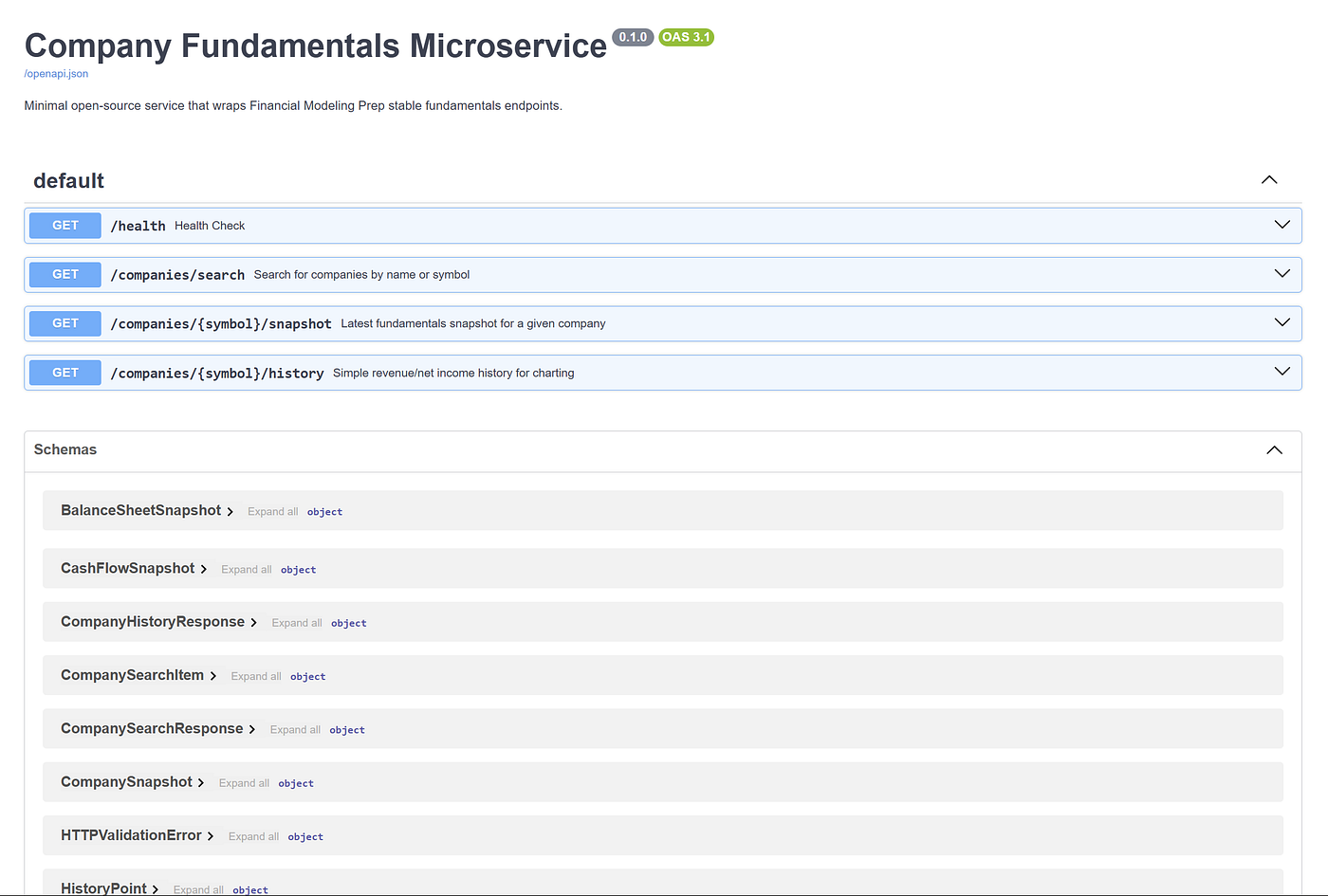
Try to check out one of the endpoints, for example, the /health endpoint:
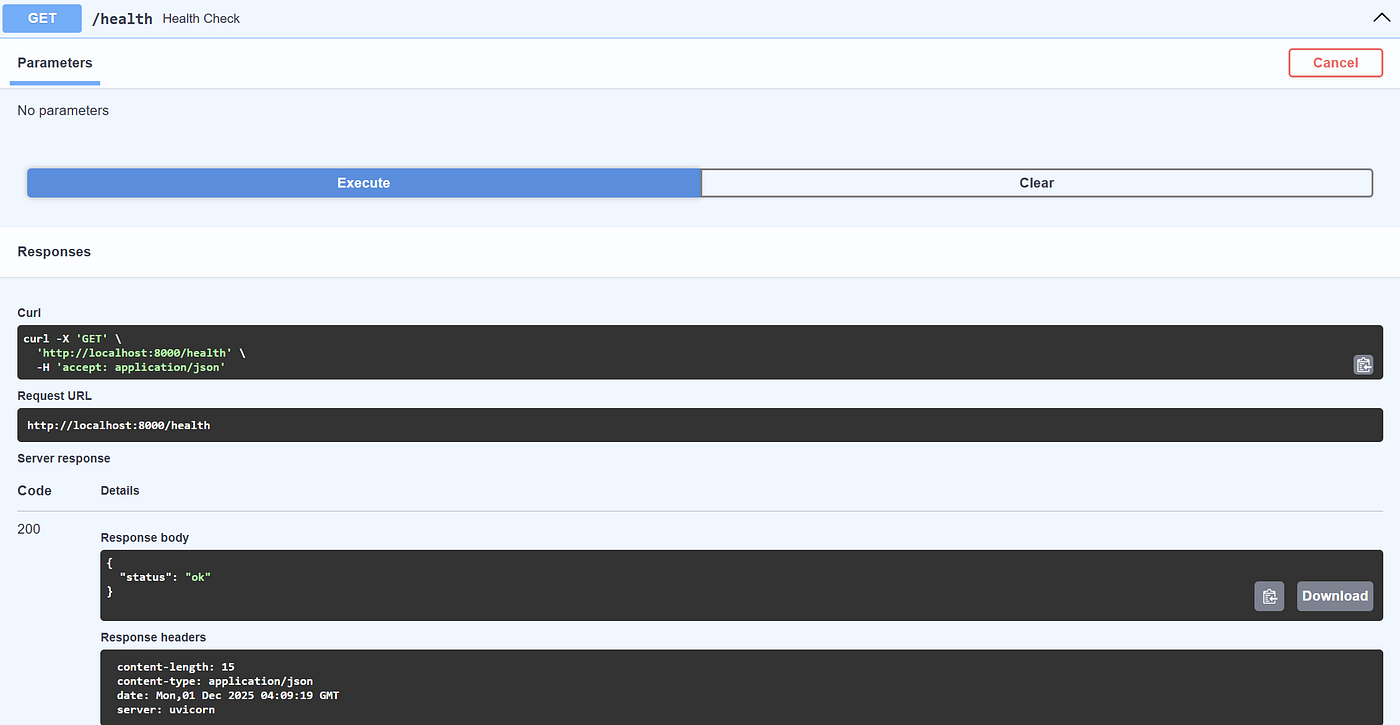
We can see that the endpoint executes correctly and returns the expected response.
Let’s try out the other endpoint, such as /companies/{symbol}/snapshot to acquire the company’s financial fundamentals:
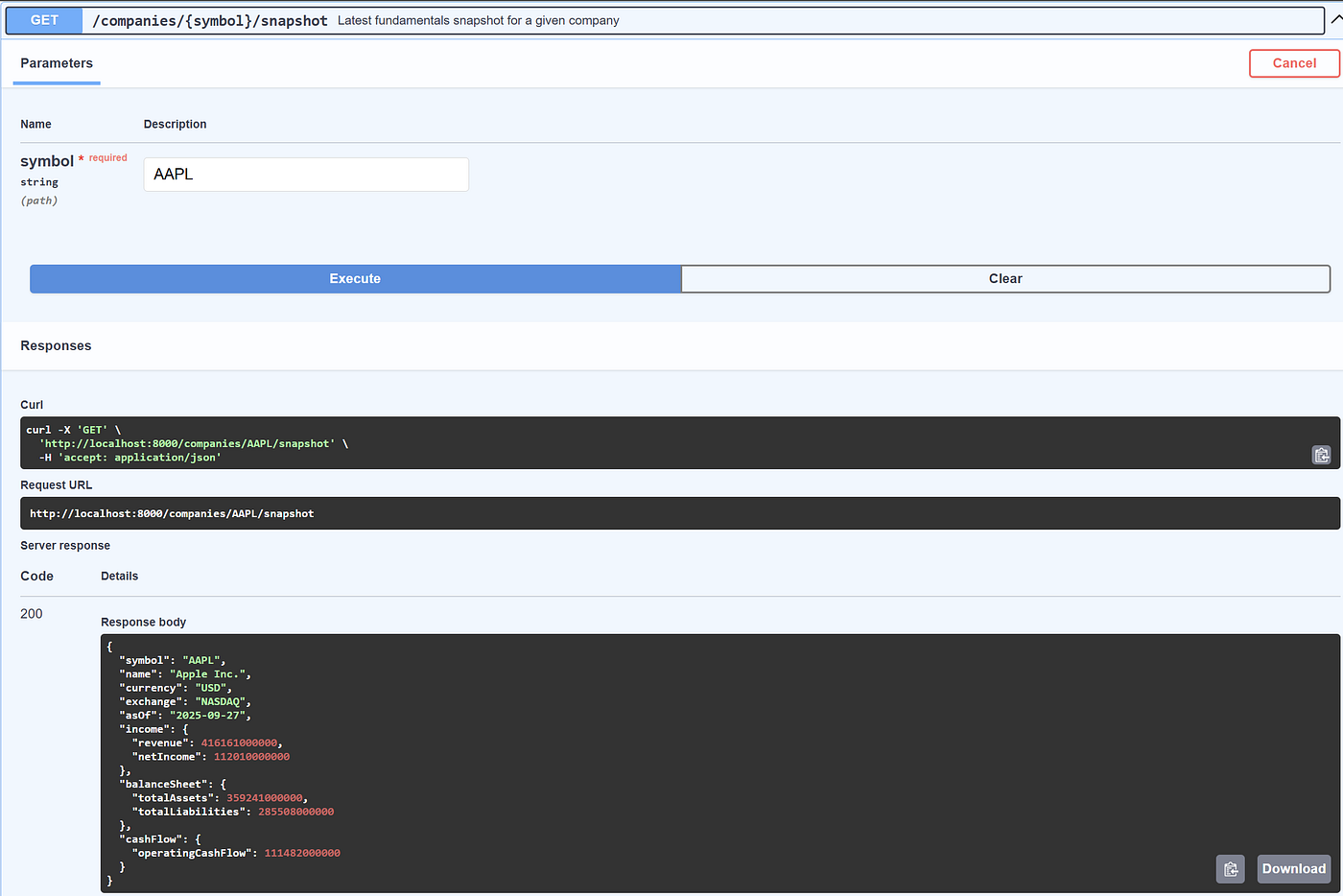
From the image above, we can see that the microservice successfully accesses multiple FMP endpoints and provides the concise output necessary for our work.
Microservice Containerization
Lastly, we will containerize our microservice. So far, we have a working microservice that runs locally. That’s fine for development, but as soon as you want to share the service with someone else or deploy it somewhere other than your laptop, we will run into dependency issues.
Containerizing the service with Docker provides a self-contained, reproducible environment that anyone with Docker can run, regardless of their local setup.
To perform Docker containerization, you need to install Docker Desktop initially. Then, fill the Dockerfile file with the following code:
ROM python:3.11-slim

ENV PYTHONDONTWRITEBYTECODE=1 \
    PYTHONUNBUFFERED=1

WORKDIR /code

# Install dependencies
COPY requirements.txt .
RUN pip install --no-cache-dir -r requirements.txt

# Copy application code
COPY app ./app

EXPOSE 8000

# Run the FastAPI app with uvicorn
CMD [”uvicorn”, “app.main:app”, “--host”, “0.0.0.0”, “--port”, “8000”]
Next, we will build the Docker image with the following command:
docker build -t microservice-financial-service .The build above will result in the reusable image we can use and share with others. Assuming your .env have appropriately filled, we can run the container with the following command:
docker run --env-file .env -p 8000:8000 microservice-financial-serviceThen, visit the http://localhost:8000/docs once more to access the Microservice documentation.
With the microservice running in the container, we can test it out in the Jupyter Notebook with the following code:
import requests

BASE_URL = “http://127.0.0.1:8000”
symbol = “AAPL”

response = requests.get(f”{BASE_URL}/companies/{symbol}/snapshot”)
print(”Status:”, response.status_code)
snapshot = response.json()
snapshot
The output result looks like this:
Status: 200
{’symbol’: ‘AAPL’,
 ‘name’: ‘Apple Inc.’,
 ‘currency’: ‘USD’,
 ‘exchange’: ‘NASDAQ’,
 ‘asOf’: ‘2025-09-27’,
 ‘income’: {’revenue’: 416161000000.0, ‘netIncome’: 112010000000.0},
 ‘balanceSheet’: {’totalAssets’: 359241000000.0,
  ‘totalLiabilities’: 285508000000.0},
 ‘cashFlow’: {’operatingCashFlow’: 111482000000.0}}
Overall, our microservice financial with FMP works well and is ready to use for any follow-up actions.
Conclusion
In this article, we have turned Financial Modelling Prep’s stable API into a small and reusable microservice that better meets our company’s needs than the raw endpoints.
By wrapping core functions such as search, snapshot, and history in FastAPI, Pydantic schemas, and a lightweight Docker image, we now have a straightforward, well-defined interface for our data acquisition.
You can use this as a drop-in data layer for notebooks, dashboards, or internal tools, and expand it over time with new endpoints, caching, or authentication as your use cases develop.
The abstraction layer you built here makes sense for teams that need to iterate quickly on financial models without wrestling with raw API responses every time. One thing that could be useful to add down the road is caching with TTL on the snapshot endpoint, since fundamentals don't change intraday but you might hit rate limits if you're querying the same symbol across multiple notebooks. I've had good luck with Redis or even just simple in-memory caching for that kind of use case.