

Take a look at these two customer messages:
“How can I request a refund?”
“My refund still has not arrived.”
Both messages mention a refund, but the customers need different kinds of help. If we only search for the word “refund,” we would put them in the same group.
This is a familiar problem when working with text data. We have the information, but we still need to organize it before we can analyze it or use it for machine learning.
Jev is one model we could use for this task. Developed by TypeSafe, Jev answers questions about text by returning a category, score, or probability that we can use in our code.
Many articles already introduce Jev and how it can help our work. However, what makes it interesting for data science? For me, it is the ability to turn a question about our data into a column we can inspect and evaluate.
In this article, we will explore what Jev does, compare it with other approaches, and walk through a Python example. We will also analyze published Jev predictions to see what happens when we only keep answers with high confidence.
Before we continue, a note about the experiment: I did not have Jev API access for this article. The API code is a documentation-based example that I have not run. The results and screenshots come from an analysis I ran on publicly available predictions so that you can reproduce that part without an API key.
What is Jev
Let’s return to the refund messages. We could give Jev a message and ask it to choose between “requesting a refund” and “checking a refund.”
There are two main parts to this request:
The state, which is the content we want to analyze.
The questions, which describe what we want to know about that content.
TypeSafe calls Jev a System One model. The idea is to make specific decisions that our program can use, rather than produce a long written answer.
It is also worth remembering that Jev is a hosted model. Installing its Python client documentation lets us call the service; it does not install the model on our computer.
Jev provides three question types. Let’s look at what each one means.
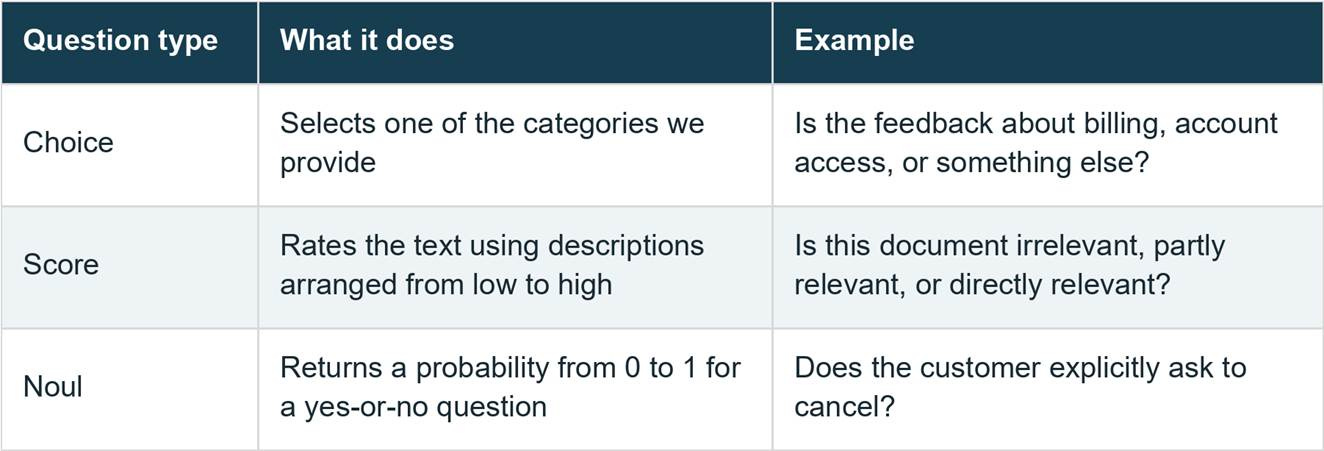
Choice and Score also return a probability distribution and a confidence value. Noul returns the probability for the statement, without a separate confidence value. See the documentation for Choice, Score, and Noul.
For our refund example, Choice would be the starting point because we want to select a category. If we wanted to rate a document's relevance, we could use Score instead.
We can include several questions in one request. However, each question is answered independently using the same state. If one result should affect what happens next, we need to write that logic ourselves.
Why would we use Jev for data science?
Suppose we have a dataset containing account information and customer messages. The account age and number of purchases are already available as columns. The messages might contain useful information too, but we cannot summarize their meaning with a simple numeric calculation.
We could ask whether each message mentions a cancellation, an unresolved issue, or a competitor. The answers could become additional features to test in our model.
This is the part I find useful. We can explain what a feature is supposed to represent and inspect the original message when its value looks wrong. That does not make the model’s internal reasoning transparent, but it gives us a clear definition for the column.
Why Jev is interesting for a data science workflow
Another interesting part of Jev is how we can use the result directly in our data workflow.
Normally, text data is difficult to use as a feature because we need to transform the meaning into something our analysis or machine learning model can understand.
With Jev, we can ask a specific question about the text and receive a category, score, or probability as the answer.
For example, suppose we have customer messages and want to know whether the customer is likely to cancel.
We could ask Jev:
Does the customer want to cancel?The returned probability could then become another column in our dataset:
cancellation_probabilityFrom there, we can use the value like any other feature. We could analyze it with pandas, apply a threshold, or include it in a machine learning model.
This is also where Jev fits well with ordinary Python code.
We do not need Jev to handle the entire workflow. We can use Jev for the part that requires understanding the text, while Python handles calculations and other deterministic logic.
For example, our workflow could look like this:
Customer message
      ↓
Jev
      ↓
Category or probability
      ↓
DataFrame
      ↓
Python logic or ML model
TypeSafe also uses this idea in its workflow evaluations. A larger task can be divided into several smaller Choice, Score, or Noul questions, while the surrounding application controls what happens next.
For me, this is probably one of the more useful parts of Jev for data science. We can convert information hidden inside text into values that are easier to analyze and test.
I would start with three applications.
1. Labeling text data
Imagine that we want to group survey responses into pricing, usability, reliability, and other feedback. We could describe these categories in a Choice question and ask Jev to suggest a label for each response.
The advantage is that we can begin with category descriptions rather than first training our own classifier.
However, these are still predicted labels. We should not treat them as verified answers just because they have been added to our DataFrame. We need to inspect a sample and measure the mistakes.
The experiment later in this article will focus on this issue.
2. Creating features for machine learning
For a customer churn model, a message asking to cancel might provide information that is missing from account activity alone. We could use a Noul question to create a cancellation-related feature, then compare our model with and without that feature.
TypeSafe includes combining text-derived probabilities with structured data among its suggested uses. This gives us an approach to try, not a guarantee that the new features will improve our model.
As a reminder, the message must be available when we make the prediction. A message written after the customer has already canceled would give our model information it should not have.
3. Selecting documents to review
We could also use Score to help organize a collection of documents. For example, we might describe what makes a paper relevant to a research question, then use the returned scores to decide which papers to inspect first.
This could be useful when we have many documents and a clear idea of what we are looking for. I would still check some of the low-scoring documents, because an incorrect score could hide something important.
These feature and document-review examples are possible applications. They were not tested in the banking-intent experiment below.
How does Jev compare with other approaches?
We already have several ways to classify text. Does that mean we need Jev as well?
Not necessarily. The choice depends on our data, the task, and how much control we need. Let’s compare the main options.
Rules and keyword matching
For exact patterns, I would start with ordinary code. Checking whether an ID follows a required format does not need a language model.
The difficulty appears when the meaning depends on the wording. In our refund example, finding the keyword is easy, but separating the two requests needs more information. We can keep adding rules, but they become harder to maintain as we encounter new expressions.
Jev lets us describe the distinction in words. Whether it handles those expressions correctly still needs to be tested.
Traditional text classifiers
Another option is to train a model using labeled examples. For instance, we could represent the text with TF-IDF features, which use weighted word occurrences, and train a classifier on those features. Scikit-learn has a text-classification example showing this approach.
If we already have representative labels and stable categories, I would include this as a baseline. A model we run locally also avoids sending every message to an external API.
Jev is different because we can change the category descriptions in the request without training new model weights. The limitation is that TypeSafe does not offer customer-specific fine-tuning for Jev. Instead, we adapt it through instructions and context.
Also, not needing training labels does not mean we can skip labeled data altogether. We still need trusted answers to check the predictions.
General-purpose LLMs
We could also ask a general-purpose LLM to classify our messages.
It would be misleading to say that Jev is the only option for structured answers. Models such as Claude support responses constrained by a JSON schema.
What I like about Jev’s approach is that the selected answer and the probabilities are already part of the response. We can use them to compare alternatives or decide which rows to review. We do not need to ask for a written statement about how confident the model feels.
This is not a capability unique to Jev, either. Traditional classifiers can provide probability estimates, and scikit-learn includes methods to check and improve their calibration.
If the task also requires writing an explanation or summary, I would consider a general-purpose LLM. If it only needs a defined label or score, Jev is another option worth evaluating.
Here is a short comparison.
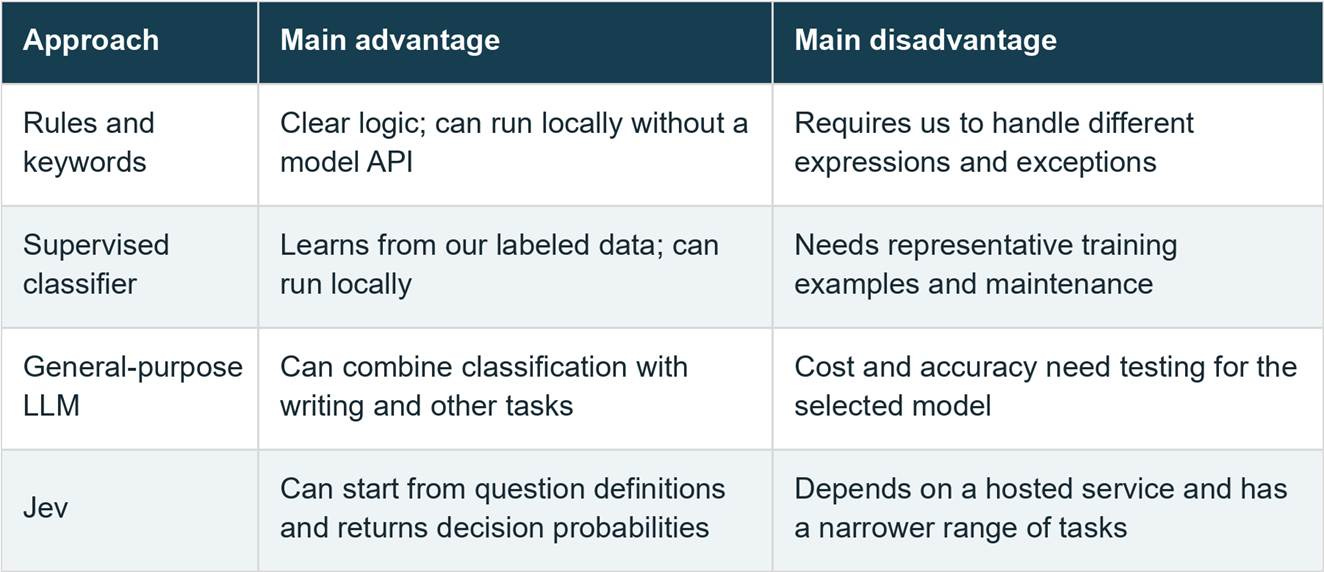
This table compares how we would use the tools. Our experiment does not rank their performance.
What are Jev’s limitations?
I'd consider a few things before adding Jev to a project.
First, it is not a general-purpose writing model. TypeSafe also documents weaknesses with counting, exact arithmetic, date comparisons, and questions that require several reasoning steps. I would leave these calculations to Python.
Second, the input still matters. Unrelated information can reduce accuracy, and adversarial instructions inside the text can influence the answer. We should test those cases rather than assume a structured response is safe or correct.
Third, the current model accepts text, not raw images or audio. TypeSafe reports its strongest language performance in English. We also need to consider API availability, rate limits, and whether we can send our data to the service.
Finally, a high confidence value can still accompany a wrong answer. We will see two examples of this in the experiment.
For me, Jev is interesting for repeated text-labeling and scoring tasks. I would not use it to replace pandas calculations or assume it will outperform a classifier trained for our particular problem.
Using Jev with Python
Let’s look at how we could add a topic and an urgency value to a small feedback dataset.
To run this example, we need a TypeSafe account, an API key, and Python 3.10 or newer. First, install the packages:
pip install typesafe-sdk pandasThe client reads the key from the TYPESAFE_API_KEY environment variable. Set it privately in your environment, and do not include it in a notebook you plan to share.
The following example uses three sample messages. I have not run this API call, so there is no claimed model output for these inputs.
import pandas as pd
from typesafe_sdk import Choice, Noul, TypeSafeClient

feedback = pd.DataFrame({
    "message": [
        "My refund still has not arrived.",
        "I cannot sign in after resetting my password.",
        "Please restore access today; my team cannot work.",
    ]
})

questions = {
    "topic": Choice(
        instructions="Select the main topic of this feedback.",
        criteria={
            "billing": "Charges, refunds, invoices, or payments.",
            "access": "Signing in, passwords, or account access.",
            "other": "A topic outside billing and account access.",
        },
    ),
    "urgency": Noul(
        instructions="Does the message explicitly express time urgency?"
    ),
}

records = []
with TypeSafeClient(model="jev-1.13.0") as client:
    for message in feedback["message"]:
        response = client.system_one(state=message, questions=questions)
        topic = response.answers["topic"]
        records.append({
            "jev_topic": topic.choice,
            "jev_topic_confidence": topic.confidence,
            "jev_urgency_probability": response.answers["urgency"].noul,
            "jev_model": response.model,
        })

enriched = feedback.join(pd.DataFrame(records, index=feedback.index))
print(enriched.to_string(index=False))
In the code above, feedback contains the messages we want to analyze. We define a Choice question for the topic and a Noul question for urgency, then send each message to Jev.
After receiving an answer, we collect the values and join them back to the original DataFrame. Keeping the message beside its predictions makes it easier to inspect the result. The request uses the documented Python client interface.
We provide descriptions for the topic categories. These descriptions help separate the options. The other category also gives the model a place to put feedback that doesn't fit billing or account access.
That price makes it worth considering for repeated labeling, but it doesn't cover the full cost of the work. We still need to account for retries and review. This example does not measure API cost or demonstrate savings over another model.
For a larger dataset, I would first test a small sample, add error handling, and save progress between batches. The loop above is intended to explain the basic usage.
Experiment: Checking Jevs predictions with pandas
Now that we understand the basic usage, let’s look at some recorded results.
AY Automate published Jev predictions for a banking-intent classification task. For this analysis, I selected the 77-category task, which contains 231 predictions: three examples per category. The publisher reports that the original model calls ran on September 19, 2026.
I have a specific question: can we use confidence to select more accurate labels, and how many rows would still need review?
This is an analysis of the published answers, not a new run of Jev.
Load the data and check the predictions
Download the published results and save the file as recorded_results.jsonl. We can then load it with pandas:
import pandas as pd

raw = pd.read_json("recorded_results.jsonl", lines=True)
df = raw.loc[
    raw["system"].eq("typesafe/jev-1.13")
    & raw["task"].eq("intent77")
].copy()
df["correct"] = df["ok"].eq(True) & df["pred"].eq(df["gold"])

print(df[["gold", "pred", "conf"]].head(3).to_string(index=False))
print(f"Accuracy: {df['correct'].mean():.1%}")
There are three columns we need to understand:
gold contains the expected label from the dataset.
pred contains Jev’s prediction.
conf contains the recorded confidence value.
We compare the predicted and expected labels to create the correct column. If the request failed, we count it as incorrect.
Here is the output:
                 gold                  pred  conf
Refund not showing up Refund not showing up  1.00
Refund not showing up        request refund  0.52
Refund not showing up        request refund  0.79
Accuracy: 78.8%
In the first three rows, the expected category is the same, but the predictions are not. Two rows were classified as request refund instead of Refund, which is not showing up.
Across the full subset, 182 of the 231 predictions were correct, giving us 78.8% accuracy.
For me, this result is a reason to inspect the labels before using them. Let’s see whether confidence helps us select a more reliable subset.
Select a confidence threshold
A threshold is simply the minimum confidence we require before keeping a prediction.
We should not choose that minimum and evaluate it on the same rows. Otherwise, we could keep adjusting it until the result looks good for the data we have already seen.
For this example, I used 77 rows to choose the threshold and kept the remaining 154 rows for evaluation. The split follows the source IDs: those ending in -0 go into the selection subset, and the others go into the evaluation subset.
This gives us one selection example and two evaluation examples per category. It is a small split of public data, not a separate production dataset.
We can perform the selection with the following code:
cal = df.loc[df["id"].str.endswith("-0")].copy()
test = df.loc[~df["id"].str.endswith("-0")].copy()

def evaluate(data, threshold):
    accepted = data.loc[data["ok"].eq(True) & data["conf"].ge(threshold)]
    return {
        "threshold": threshold,
        "accepted": len(accepted),
        "correct": int(accepted["correct"].sum()),
        "accuracy": accepted["correct"].mean(),
        "coverage": len(accepted) / len(data),
    }

thresholds = [0, .5, .7, .8, .9, .95, .99]
sweep = pd.DataFrame([evaluate(cal, t) for t in thresholds])
eligible = sweep.loc[(sweep["accuracy"] >= .95) & (sweep["accepted"] >= 10)]
if eligible.empty:
    raise ValueError("No threshold met the rule; keep manual review.")
chosen = eligible.sort_values(
    ["accepted", "threshold"], ascending=[False, True]
).iloc[0]
threshold = float(chosen["threshold"])
print(sweep.round(4).to_string(index=False))
The code tries seven thresholds. From the thresholds that reach at least 95% accuracy and keep at least 10 selection rows, it chooses the one that keeps the most rows.
These requirements are settings for our example. They are not universal rules for using Jev.
The selected threshold was 0.99. On the selected subset, it kept 32 predictions, of which 31 were correct.
Next, let’s apply that same threshold to the 154 evaluation rows:
result = evaluate(test, threshold)
print(result)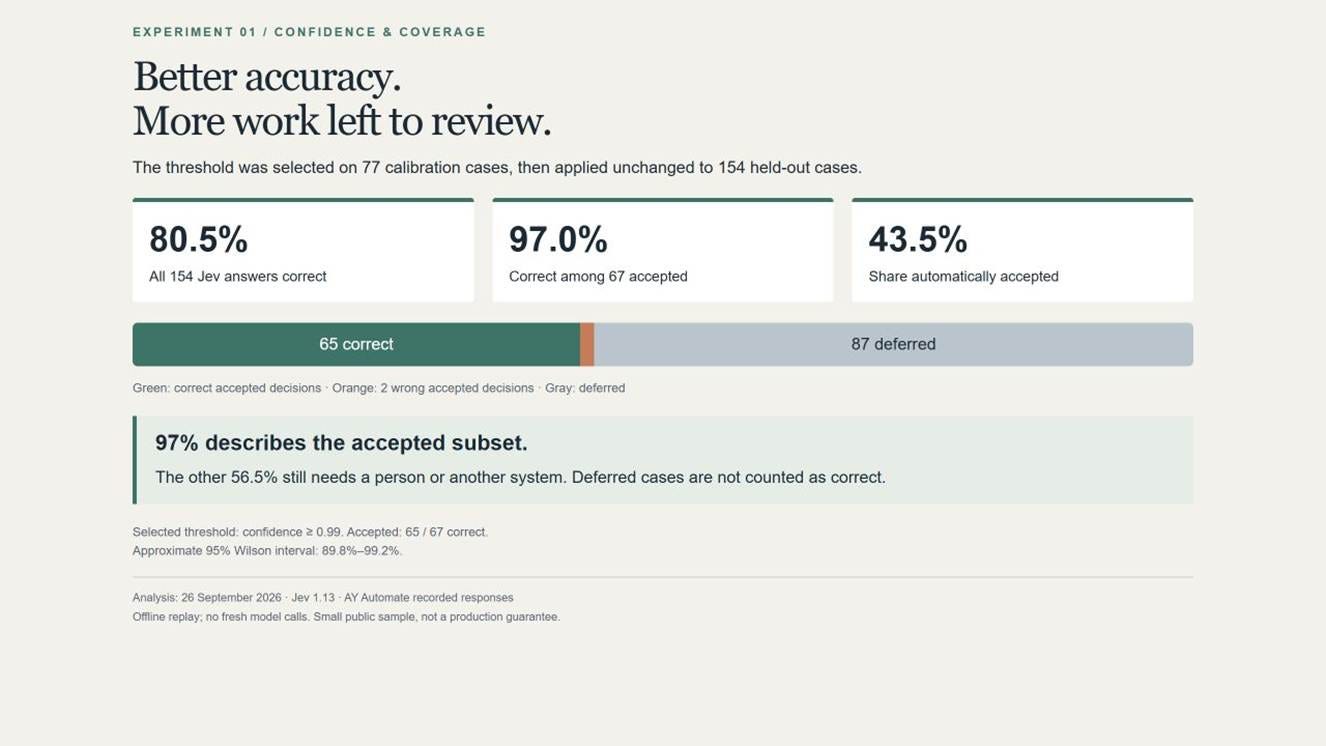
As the result shows, the filter kept 67 predictions, and 65 were correct. This gives us 97.0% accuracy among the accepted predictions.
Without the filter, Jev was correct on 124 of the 154 evaluation rows, or 80.5%.
The filtered result looks better, but we need to check how much data remains. Only 43.5% of the evaluation rows passed the filter. This percentage is called coverage. The other 87 rows, or 56.5%, still need review.
In other words, we have not made Jev 97% accurate on the whole dataset. We have selected a smaller group of answers that were more accurate in this experiment.
This helps plan the labeling process because we can see both the quality of the selected predictions and the remaining work.
Inspect the incorrect answers
Two mistakes remain among the accepted predictions. Let’s take a closer look.
test["review_required"] = ~(
    test["ok"].eq(True) & test["conf"].ge(threshold)
)
test["candidate_label"] = test["pred"].where(~test["review_required"])

errors = test.loc[
    ~test["review_required"] & ~test["correct"],
    ["gold", "pred", "conf"],
]
print(errors.to_string(index=False))

test[["id", "pred", "conf", "candidate_label", "review_required"]].to_csv(
    "label_review_queue.csv", index=False
)
The code marks rows that need review and creates a candidate_label column for the predictions that passed the filter. It also saves the result to label_review_queue.csv.
I use the name “candidate label” deliberately. Passing the filter does not turn a prediction into a verified answer.
The two accepted mistakes are shown below.
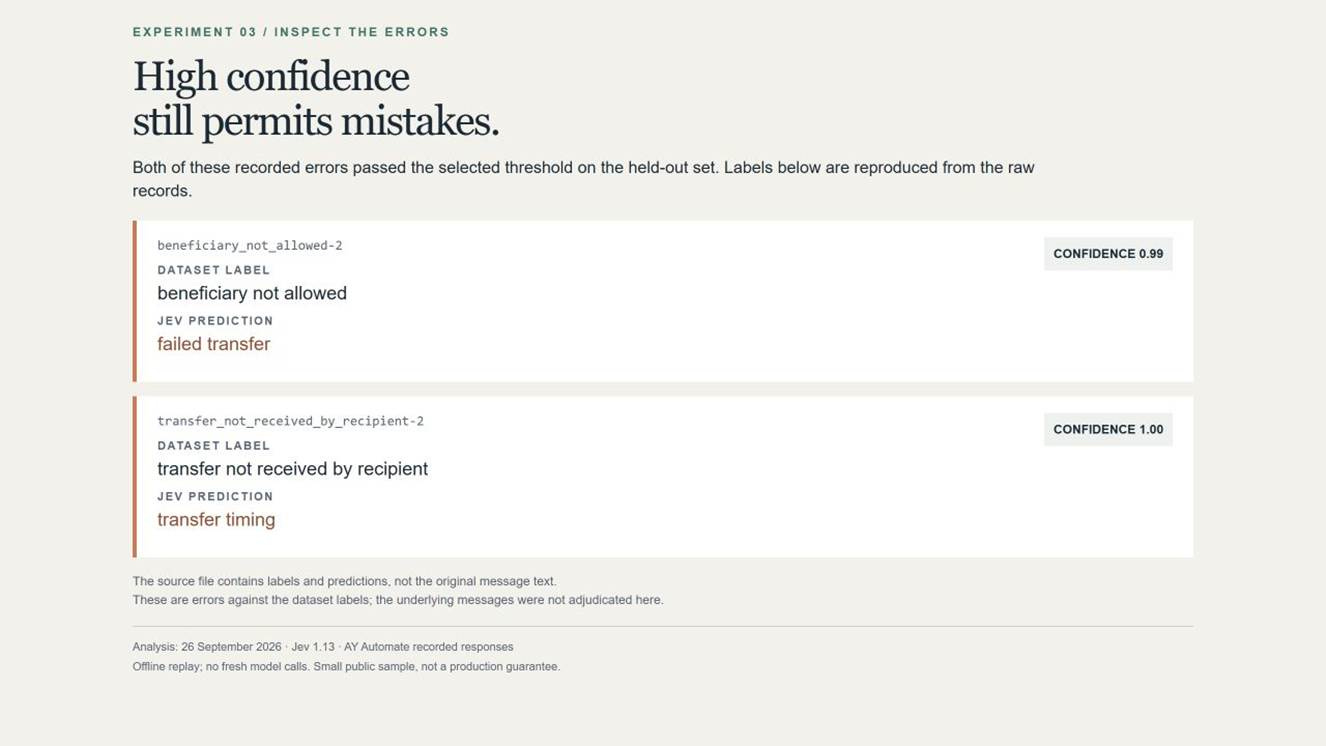
The first prediction was failed transfer, while the expected label was beneficiary not allowed. The second was transfer timing, while the expected label was transfer not received by recipient.
Notice that the second answer had a confidence of 1.0. It was still incorrect.
TypeSafe explains that confidence summarizes how concentrated the probabilities are around an answer. It should not be read as a guarantee that a particular prediction is correct.
The source file contains the labels and predictions, but not the original messages. That means we can identify these disagreements, although we cannot explain exactly why the model made them from this file alone.
What did we learn from the experiment?
What I find useful is that we can separate the predictions into two groups: those we might use after further checks and those that need review.
However, I would not take the 0.99 threshold and apply it directly to another dataset. Different categories, languages, and message styles could produce different results.
For my own dataset, I would start with a small human-labeled sample. I would use part of it to improve the category descriptions and choose a threshold, then evaluate the final setup on data I had kept separate. I would also compare it with a simple classifier rather than assume that Jev is the best option.
One more point to remember for EDA: If we only count categories among the accepted rows, we may get a misleading picture of the full dataset. The accepted rows could contain easier examples or a different mix of topics. We should keep the rejected rows visible in our analysis.
For feature engineering, we would need another experiment. We would compare the prediction model with and without the Jev-derived features, using the same evaluation data. Better labels in this example do not prove better churn predictions.
The size of this experiment is also a limitation. Only 67 evaluation predictions passed the filter. Their approximate 95% Wilson interval is 89.8% to 99.2%, which shows how uncertain the accuracy estimate remains with a small sample. That interval does not account for every dependency in the data.
I did not independently verify the published responses against provider logs or measure new inference speed, API costs, or human-review time. The companion files include the executable analysis and source-file checksum so that readers can check the calculation.
Conclusion
Jev is a model for answering defined questions about text. We can use its categories, scores, and probabilities as values in our data science projects.
For me, its main attraction is being able to try a text-labeling task or a new feature without first training a separate classifier. Its limitations include reliance on an external API, a narrower range of tasks, and answers that still need validation.
In the experiment, a confidence filter selected 67 of 154 evaluation predictions, 65 of which were correct. The remaining 87 rows still needed review. This shows a possible way to organize labeling work, but it does not establish that Jev is better than every alternative.
I would begin with one text column and one clearly defined task. Check the predictions, compare them with a simple baseline, and decide whether the result is useful before processing the rest of the dataset.